Optimized Routing & Field Efficiency

Visit more locations in less time. Collect more higher-quality data during visits. Analyze your team’s field performance.
Leverage Mapsly’s routing, automation, integration, and AI capabilities to help your outside sales and service team’s reach its maximum potential: plan optimal routes for individual users or entire team’s, gather precisely the data you need during visits with real-time validation and sync to your CRM, view your team’s real-time location and detailed field performance analytical dashboards.

高度なデジタルツールでフィールドチームのパフォーマンスを向上

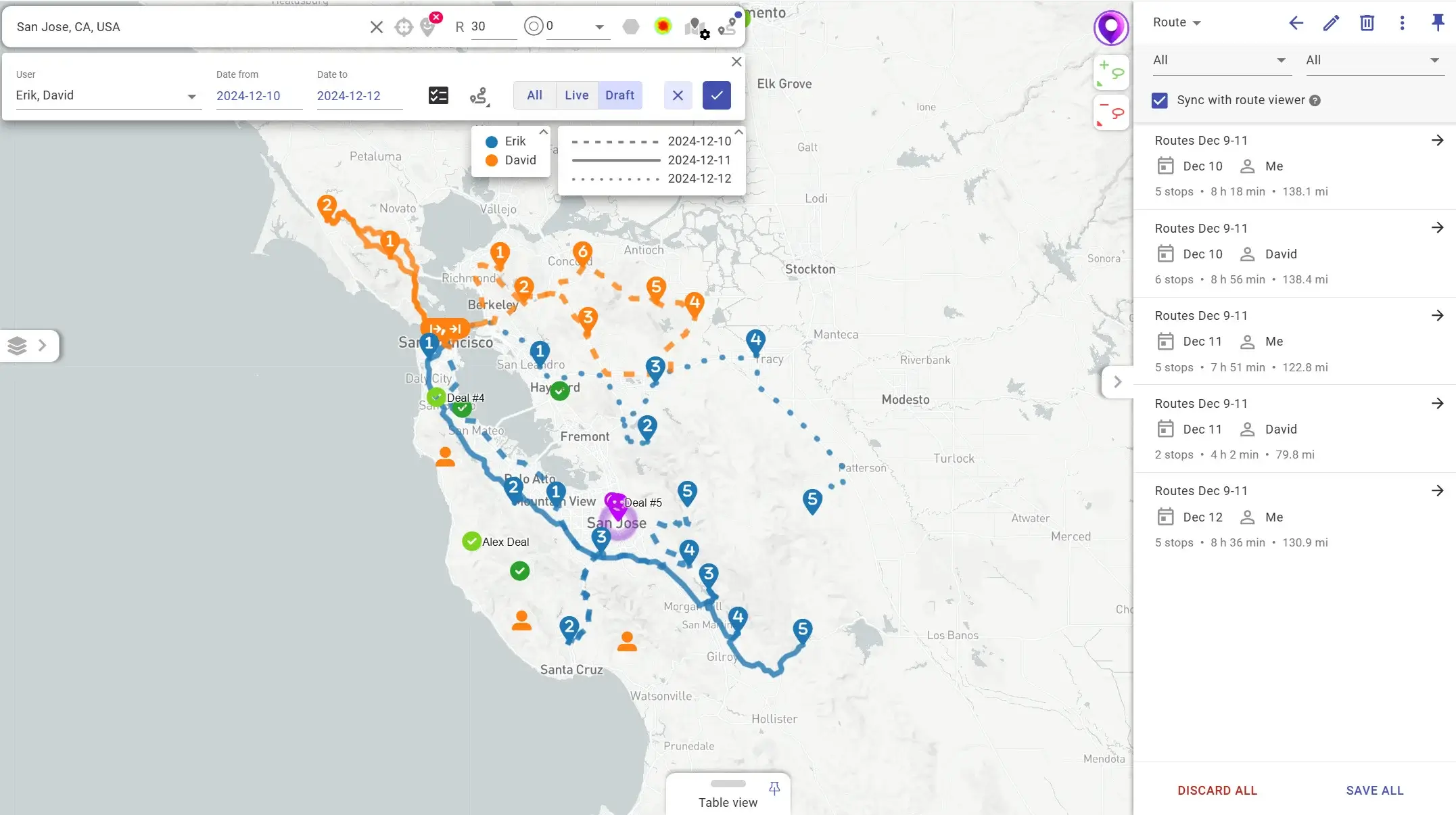
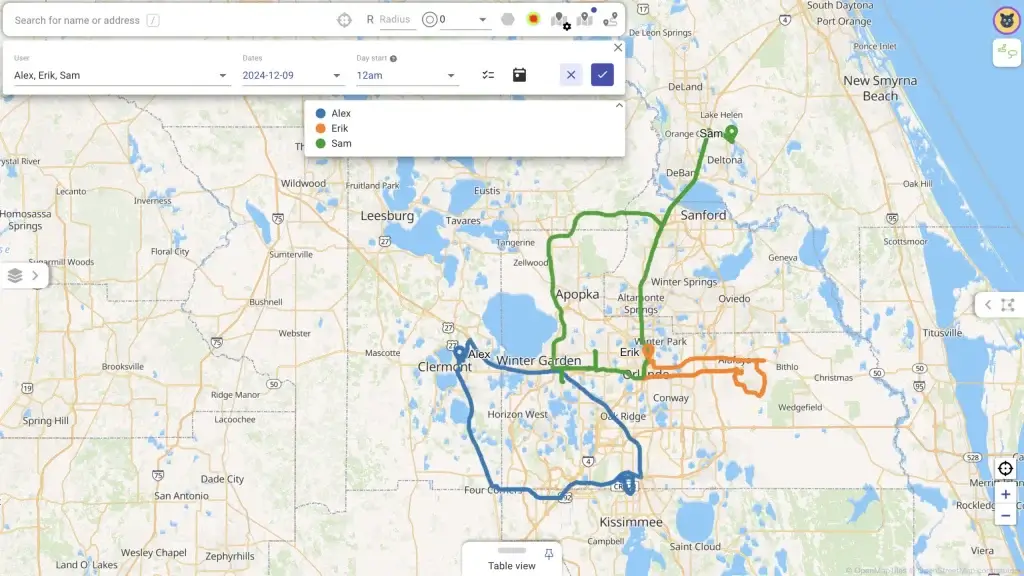
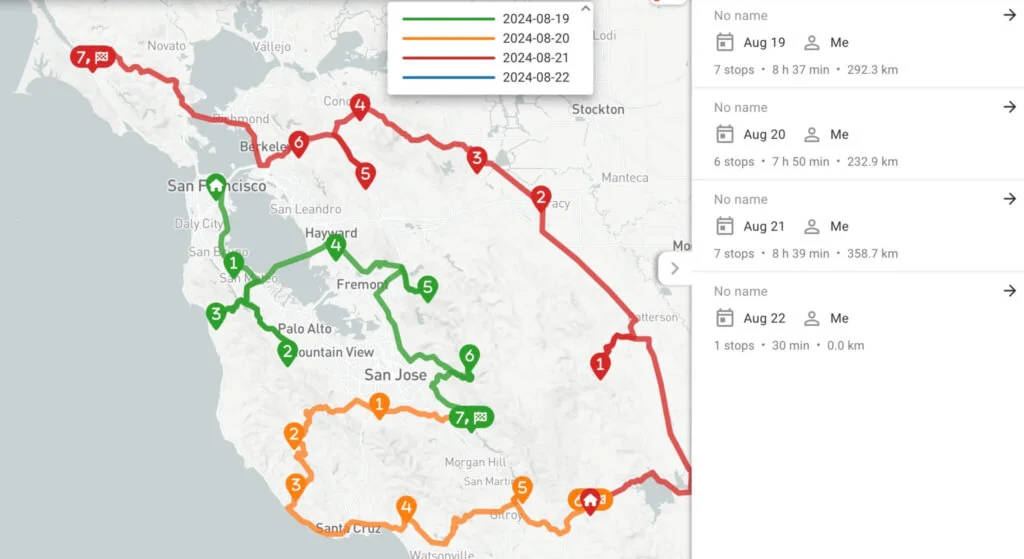
Optimized multi-day team routing

Plan optimal routes based on live and historical traffic for days, weeks, and months ahead through up to 2,000 locations and 30 users at a time. Mapsly accounts for a wide range of users’ and locations’ parameters like working schedules, open hours, required skills and equipment, and many more, as well as configurable optimization objectives.

Add locations to your routes on the go

Add more points to your current route in one swipe, and Masply will reorder unvisited route activities based on your current location to keep your route optimized.

Adaptive check-in forms with geofencing

Guide your field sales and service teams through the visit process with adaptive forms pre-configured to gather the data you need based on the visit objective, with immediate location and data validation, as well as real-time data sync to your CRM or spreadsheet. Add your custom buttons and forms in minutes. Forms support photo/video capture, on-screen e-signature, and bar/QA code recognition.

Learn more about configurable check-in with geofencing >

Learn more about visit scripting >

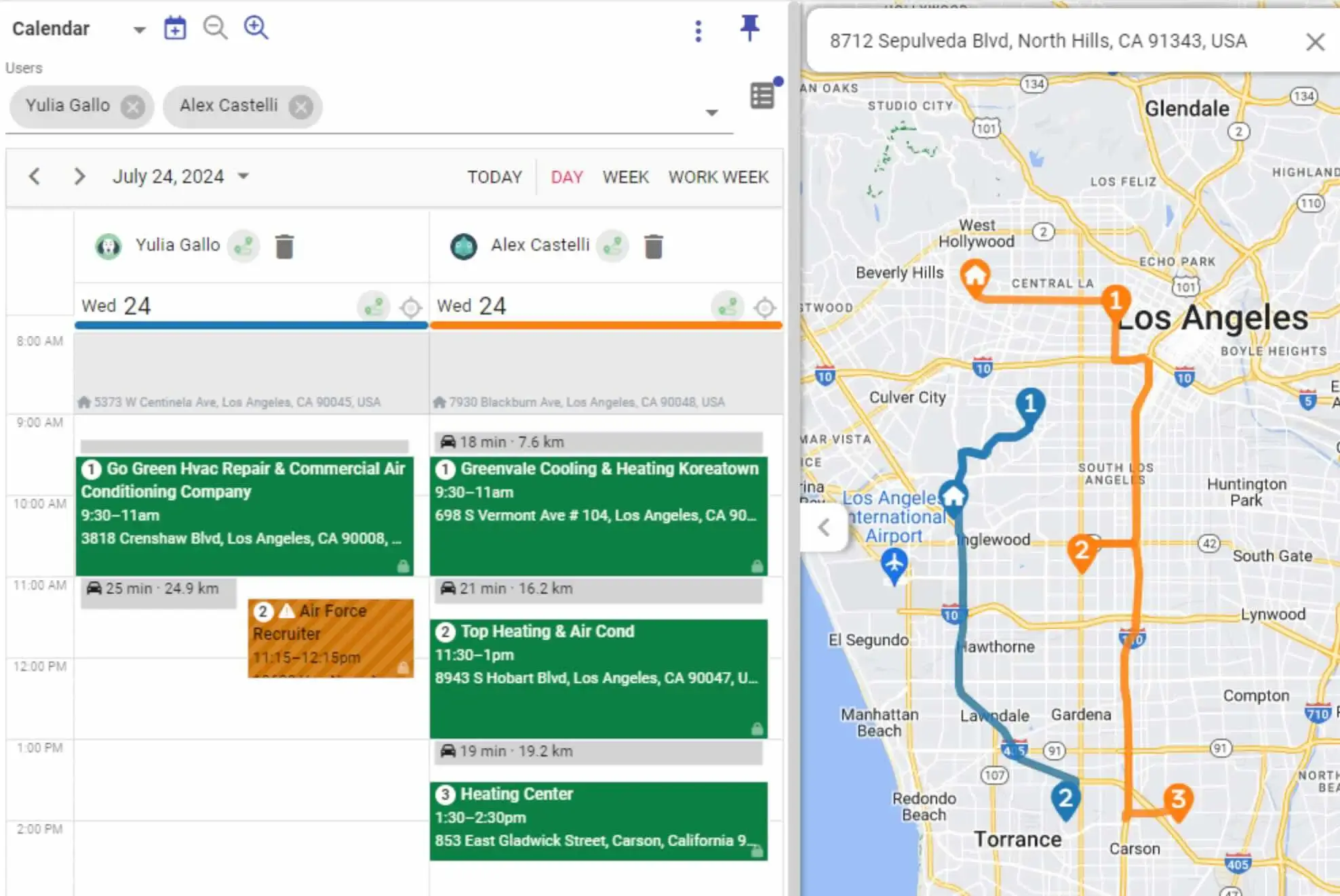
Calendar with integrated route optimization

When planning new visits, Maply will help you avoid scheduling conflicts by accounting for calendar events from your CRM, Outlook, and Google Calendars and using their location to optimize your route. You can also export new route activities to your calendar, and see travel time between meetings in a calendar view.

Learn more about Travel-Aware Calendar >

マップスライAI
プライベートベータ

AI音声モード

すべてのプラン

CRMに話しかける

すべてのプラン

音声メモを録音

すべてのプラン

音声またはテキストで操作

Pro および Enterprise

メールとテキストメッセージの下書きを作成

すべてのプラン

会議前のブリーフ

すべてのプラン

エージェント型ルーティング

Pro および Enterprise

AIセールスコーチング

Pro および Enterprise
デモを申し込む
9:41
Voice — next stop
You · Voice

“Hey Mapsly, what’s my next stop?”

Speaking

Nordwind Supply, 12 minutes away. You’re meeting Sarah Lee, Ops Lead. $40,000 deal in Negotiation.

Speaking

Last visit, 12 June: she promised a pilot by August. Ask how it went.

ListeningSpeakingEnd
I’m listening — go ahead.Speaking…
Type a message…
Your data
Nordwind Supply · Deal
Next visitToday · 12 min away
ContactSarah Lee, Ops Lead
Amount$40,000
StageNegotiation
Last visit12 Jun · promised a pilot by August
9:41
Ask — nearby accounts

Who’s overdue near me?

3 overdue accounts within 5 minear you
Acme Corp0.8 mi · 12 days overdue
Bay Dental2.1 mi · 9 days overdue
Lakeside Vet3.4 mi · 30 days overdue
Add them to today’s route

Added. You’re back by 4:30.

Type a message…
Your data
Overdue accounts near you
Acme CorpBay DentalLakeside Vet123
3 stops added to today’s route
9:41
Voice note — Nordwind
0:030:070:120:17

“Met Sarah at Nordwind, they’re in for the Enterprise plan, budget forty K, demo next week, send pricing after.”

transcribing…saved
Note · Nordwind Supply
Sarah LeeOps Lead
Enterprise plan$40,000 budget
Demo next weekthen send pricing
ResolvedSaved to the account
Type a message…
Your data
Nordwind Supply · Notes
Just now · voice note

Sarah Lee (Ops Lead) is in for the Enterprise plan at $40,000. Demo next week, then send pricing.

12 Jun · visit

Promised a pilot by August.

28 May · call

Intro call with Sarah Lee, routing 30 reps by hand.

9:41
Actions — Nordwind
You · Voice

“Update the deal to $40K, book the demo for Tuesday and send the recap.”

Here’s what I’ll do4 changes
Update deal$40,000 · Negotiation
Book demoTue, Sep 16 · 2:00 PM
Send recap emailTo Sarah Lee
Create taskSend pricing after the demo
Confirm
ResolvedSynced to your CRM
Type a message…
Your data
Deal · Nordwind Supply
Amount$35,000$40,000
StageNegotiation
Meeting
DemoNot scheduledTue, Sep 16 · 2:00 PM
Email
RecapSent to Sarah Lee
Task
Send pricingOpen · due Wed
9:41
Email — Sarah Lee
You · Voice

“Draft a recap for Sarah with the pricing and the demo time.”

DraftEmail
ToSarah Lee · Nordwind Supply
SubjectPricing recap and next steps

Hi Sarah, thanks for today. As discussed, the Enterprise plan comes in at $40,000 with implementation included.

I’ve booked the demo for Tuesday at 2 PM and attached the pricing details.

Edit
Send
ResolvedSent to Sarah Lee
Type a message…
Your data
Sarah Lee
RoleOps Lead
AccountNordwind Supply
Deal
PlanEnterprise
Amount$40,000
Meeting
DemoTue, Sep 16 · 2:00 PM
Email logged on the account
9:41
Brief — Nordwind
Nordwind Supply in 4 min — your brief is ready
Before you walk inNordwind Supply
Sarah LeeOps Lead · met twice
$40,000 · Enterprise planNegotiation
Last visit, 12 JunPilot by August, not met yet
Suggestion

They route 30 reps by hand every Friday: show the multi-user run.

From memory · call on 28 May
Suggestion

Raise the renewal: it expires in 34 days.

Type a message…
Your data
Sarah Lee
RoleOps Lead
Meetings2
Ops note30 reps routed by hand on Fridays
Deal
Amount$40,000 · Enterprise plan
StageNegotiation
Last visit · 12 Jun
NotePromised a pilot by August
Contract
RenewalOct 8 · in 34 days
9:41
Route — today
Riverside Medical cancelled — finding the next best stop
Today’s route3 stops
1Nordwind Supply9:30 · done
2Riverside Medical11:00
Cancelled
2Bay Dental11:10 · 6 min away · new
3Harbor Foods1:30
Speaking

Bay Dental slotted in, 6 minutes away. You’re still on time.

Type a message…
Your route
Today’s route
1232
Route updated · still on time
9:41
Coach — Nordwind
Customer

“They’re comparing us with a cheaper tool.”

Coach

Say it early: implementation is included.

Customer

“Our warehouse has no signal half the time.”

Coach

Offline capture beats their current app in the warehouse.

Customer

“What would this cost for 30 reps?”

Coach

Ask about the Q4 rollout before pricing.

ListeningEnd
In meeting · Nordwind Supply
Type a message…
Your playbook
Plays for this meeting
If a competitor comes upSay implementation is included
If connectivity comes upBring up offline capture
If they ask about priceQualify the rollout first
If renewal is within 60 daysRaise the renewal
Set by
ManagerMaria Chen · Sales Manager

Real-time location tracking with detailed reporting

See your field team’s real-time location on the map. View their location history, ‘traveled time/distance’ daily reports, and ‘planned vs fact’ analysis. Enable automatic location-based check-in.

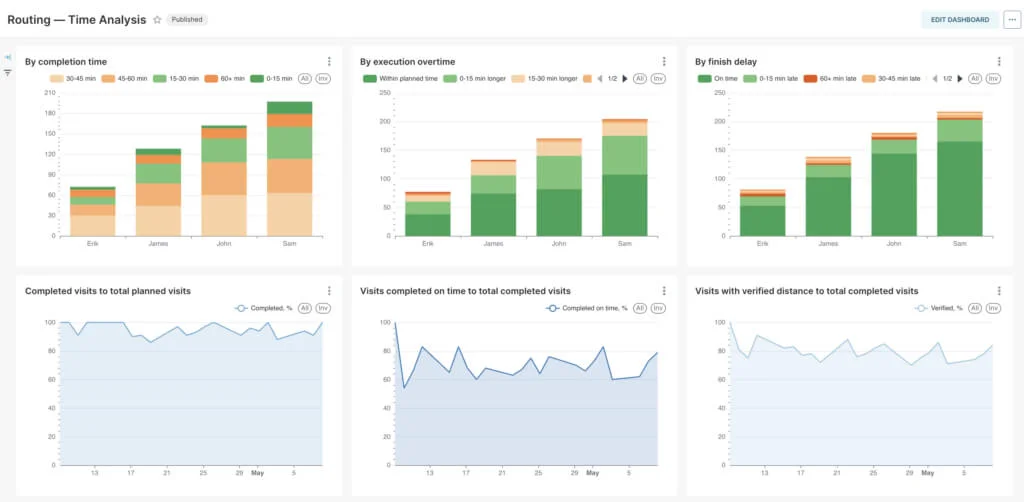
Configurable field performance analytics

View your team’s field performance metrics and time analysis in analytics dashboards that come out of the box with Mapsly Analytics and are fully adjustable to meet your particular needs. Mapsly Analytics is also pre-loaded with your up-to-date CRM data.

Learn more about Mapsly Analytics >

Unlock 3X Productivity For Your Team:
Get Your Complete Field Team Playbook

Strategies from high-performing field teams to save hours, capture perfect data, and deliver more visits every day.

Arrow pointing to guide
User
*
User
*
会社概要
*
Job
*
Email
*
Triple Your Field Team's Productivity Guide

More routing features

Various user/vehicle parameters

ユーザーのデフォルトの勤務スケジュール(開始/終了場所と休憩時間を含む)を設定し、任意の期間に合わせてカスタマイズできます。スキル/機器を割り当てます。1日あたりの最小/最大ジョブ数と最大運転時間を設定します。

Various visit parameters

カスタム訪問時間、必要なスキルまたは機器、営業時間、優先度、キャパシティ、車内での最大時間、ジョブタイプをCRMやその他のデータソースで直接設定できます — Mapslyがそれらを自動的に使用します。

Set optimization objectives

移動時間の最小化、ユーザー間の訪問数の均等化など、複数の最適化目標から選択できます。

Plan "around" calendar events

Connect your CRM, Outlook, or Google calendar, and Mapsly will plan new visits without scheduling conflicts with existing meetings and with meetings’ locations taken into account to minimize driving time.

Re-optimize calendar events
Include calendar events as route jobs to reshuffle them in the most optimal order to minimize drive time and, optionally, re-assign them to another user to decrease the team’s total driving time.
Export routes to calendars
Create calendar events based on your route activities. Export one route or multiple routes at a time. Mapsly automatically “rounds” events’ start time (e.g., 10:23 → 10:30).
Long-haul routing
Plan multi-day routes with night stops along the way. Set custom rules for splitting long jobs into multiple days. Choose whether nights should be planned at jobs’ locations or along the way between jobs.
Plan regular visits
Plan repeated visits to locations based on custom visit frequency and priority that can be specified for each location in your CRM.
Mobile app with offline mode
Mapsly comes with an iOS/Android mobile app for phones and tablets, which supports offline CRM data and maps, photo/video capture, bar/QA code recognition, on-screen e-signature, and offline navigation.
Pickups and deliveries

Choose between 4 job types: service, pickup, delivery, or pickup+delivery in one route. For pickups and deliveries, Mapsly will match a job’s capacity against your vehicles’ available capacities.

Late arrival alerts
View the forecast arrival time and how early or late you will arrive at each location based on the current traffic as you progress through your route. Choose between multiple prediction modes.
Re-plan missed visits
Configure Mapsly to enable manual or entirely automatic replanning of skipped visits.
Truck routing
Mapsly can plan routes for cars or various types of trucks, avoiding roads that don’t permit or support your types of trucks.
Multiple object types
Plan visits to multiple CRM object types (e.g., Contacts, Accounts, and a custom CRM object) in one route. Optionally, add custom locations by their addresses or coordinates.
Multi-dimensional capacity
Route jobs’ and vehicles’ capacity may have multiple dimensions at the same time, like weight, volume, or item count.
Programmatic routing
Mapsly can plan optimal routes and replan skilled visits entirely automatically, based on your desired rules and schedule. Our solution engineers will implement your desired planning process within hours.
Custom job statuses
Define custom job statuses and how they are shown in Mapsly’s user interface, and add workflows triggered by those statuses to implement your custom processes.
Custom buttons and forms
Add more buttons (e.g., Check Out) and forms (e.g., to select a custom status where a visit is completed or to implement different visit scripts for different location types) with your custom business logic.
Analyze data with AI

Analyze user data gathered during visits, or any other data from your CRM and other data sources, with OpenAI’s latest ChatGPT models based on your custom prompts. さらに詳しく >

CRM-controlled routing
All individual job and user/vehicle parameters in Mapsly are mapped by selecting CRM fields and are retrieved from your CRM during planning so you can control them directly from your CRM.
Save routes to CRM
The route planning results, including route structure and visits, are accessible programmatically and can be automatically saved to your CRM or another data source. Talk to us about your custom requirements.
Pre-loaded routes
Mapsly can be configured to pre-load today’s routes for users just before their working day starts. Routes can also be loaded into users’ Mapsly mobile app programmatically based on desired business rules.
Granular routing permissions
Allow or disallow certain actions for your users, e.g., whether they can edit a route and, if so, whether they can only add or also remove locations.
Allowed/disallowed users
Optionally, specify if a visit can only be assigned to certain users or, on the contrary, cannot be assigned to certain users. This can be indicated on a per-job basis in mapped CRM fields.
まもなく Integrated offline navigation
Navigate through locations in your route without leaving Mapsly, with custom buttons integrated into the navigation screen for higher efficiency.
まもなく 'Out for delivery' web-app
Text/email your recipient an link with an Uber-style interactive map with your courier’s location, estimated time of arrival, order details, and custom buttons. Entirely customizable.
まもなく Chat with clients & employees
Your team can chat with each other without leaving Mapsly, in the context of clients, orders, or custom objects, and with external customers.

旅行を意識したカレンダー

Mapslyで, Routing-Powered Calendar, you can チームのカレンダーイベントをルートとして表示 on the map, see traveling time between meetings and can 自動順序設定を使用し、既存の固定時間のミーティングの“合間”に新しいミーティングを最適に計画する right on your calendar timeline, or by exporting your routes to the calendar. 

Mapsly’s Calendar is integrated with your CRM’s calendar, Google Calendar and MS Outlook Calendar. 

Long-haul routing with night stops along the route

Configurable night stops
Choose if night stops should be planned (A) at a job’s location or (B) along the route between jobs.
Configurable breaks
Choose if breaks must be planned (A) within a certain time window or (B) based on the specified maximal continuous driving time.
Flexible overtime

Mapsly can extend a working shift to ensure a job is completed on the same day if it only exceeds the normal working hours by a certain margin.

Automatic job splitting
Mapsly can split long jobs into several days while ensuring that the resulting individual parts are not too small.

Regular visit planning

If your team regularly visits your points of sale, clients, vendors, or any locations represented by a CRM object, Mapsly can help you plan repeated visits with the desired frequency, while minimizing the cumulative driving time and maximizing the team’s capacity. 

ロケーションへの訪問間隔として希望する日数は、このデータを保存するCRMフィールドをマッピングすることで、各ロケーションに指定できます, これは、所要時間、営業時間、必要なスキルとキャパシティ, などの他のジョブパラメータのマッピングと同様です. 

As new locations are added or existing ones are removed, routes can be re-planned — Mapsly will use the check-in events to determine when locations (records) were visited last time to plan the next visit for each of them. During re-planning, previously planned routes are removed and re-created to account for the up-to-date set of target locations and their properties.

You can plan repeated visits using Mapsly’s Route panel, or Mapsly can plan them entirely automatically following a pre-configured process.

Location tracking with Mapsly mobile app & daily reporting

Using the Mapsly mobile app your traveling users can track their location, and Mapsly users with appropriate permissions can view their current position and the history of their movements.

Tracking can be automatically activated and deactivated by schedule and continues to work even after the Mapsly mobile app is unloaded from memory (swiped up in the list of apps) or the phone/tablet is rebooted.

Location tracking is thoughtfully designed to preserve battery. In particular, it uses the phone’s accelerometer to determine when the user stops – to pause tracking and data transmission until the user resumes moving.

Location tracking does not require an internet connection to work – while offline, the mobile app collects location data and transmits it to the Mapsly server once the mobile device is back online.

Once a day, for each tracked device Mapsly summarizes the total traveled distance and time and the report is available for your analysis.

Offline Mode in Mapsly Mobile App

On Mapsly’s Pro and Enterprise Plans, users may continue to use Mapsly’s mobile app even without an active internet connection. The following functions are available when offline:

  • viewing CRM and spreadsheet data,
  • viewing the map (within regions previously downloaded for use when offline),
  • creating new and updating existing CRM records,
  • checking in to and out of your visits (certain limitations to forms will apply),
  • using custom buttons and forms (with certain limitations).

While offline:

  • new and updated data and files are cached on your mobile device — and synced with the Mapsly server when you’re back online,
  • automation scenarios initiated with buttons/forms are queued with their input data — and are executed on the server when the connection restores.
 

まもなく Give Your Recipients an Interactive Out For Delivery Map

Text your recipients a link with an interactive map  showing your courier’s location on the map, a route line to the recipient’s location, estimated time of arrival — all updating in real time — as well as their delivery order details and actions buttons to reschedule delivery, leave feedback, etc.

Built with Mapsly’s app builder (part of Mapsly Automation Platform), this customer-facing app is entirely customizable and can be upgraded to a fully-featured customer portal, within days and without the need for any custom IT development.


Tekmetric が Mapsly でフィールド営業チームを強化する方法

Tekmetric が Mapsly のルート最適化、見込み客開拓、データクレンジングツールを活用して、対面での営業活動を拡大し、自動車修理工場へのサービスを向上させている方法をご覧ください。

準備はいいですか?