




Airtable がマップでできること、できないこと
Airtable のネイティブ, マップ拡張機能 レコードをピンとしてプロットします。住所または座標を含むフィールドを指定し, 独自の Google Maps API キーを追加すると, ジオコーディングを実行して、位置情報をクリック可能なピンとして表示します, いくつかのマーカースタイル設定オプション付き.
しかし, できるのはそこまでです。ネイティブのマップビューは表示専用です: ルートの最適化, 複数日または複数ユーザーの訪問計画, テリトリー管理, モバイルフィールドアプリの運用はできません。また, base に何かを書き戻すこともありません。実際にそれらの場所へ移動するチームにとって, 地図上にピンを置くことは簡単な部分です。難しいのは, その後に続くすべてのことです。
ここでネイティブ拡張機能の役割は終わり、Mapslyのようなツールが引き継ぎます:
| 機能 | Airtable ネイティブのマップ拡張機能 | Airtable + Mapsly |
|---|---|---|
| レコードを地図上に表示 | はい | はい |
| 住所をジオコーディング | 手動、自分の Google Maps API キーが必要 | 自動: 住所をクリーンアップ, 不足している郵便番号/郡を入力 |
| 最適化された複数地点ルーティング | いいえ | はい |
| 複数日 & 複数ユーザーの計画 | いいえ | はい |
| 車, トラック, 自転車 & 徒歩モード | いいえ | はい, トラック規制あり |
| テリトリー管理 & 自動割り当て | いいえ | はい |
| ノーコード自動化 | いいえ | はい |
| check-in付きモバイルアプリ | いいえ | はい |
| ご利用のベースとのリアルタイム同期 | 表示のみ | はい, リアルタイム |
Airtableのレコードをライブマップビューで表示、
Mapsly では Airtable ベースのインタラクティブなマップビューを利用でき, 独自の API キーは不要です. 住所または座標を含むすべてのレコードがピンになります.
フィルタリングして色分けします. Airtableの任意のフィールドでピンのスタイルを設定: ステータス、所有者、優先度、商談規模、サービスタイプ.
その場で編集. マップのポップアップでレコードを直接更新するか、テーブルビューで一括更新します。
テリトリーを描画します。 テリトリーを描画またはインポートし、それぞれの内部に含まれるレコードを確認できます。
コンテキストを追加. US Census を含む人口統計データと位置データを重ねて表示します。
共有して埋め込む. チームメイトやパートナーにライブマップを提示しましょう。
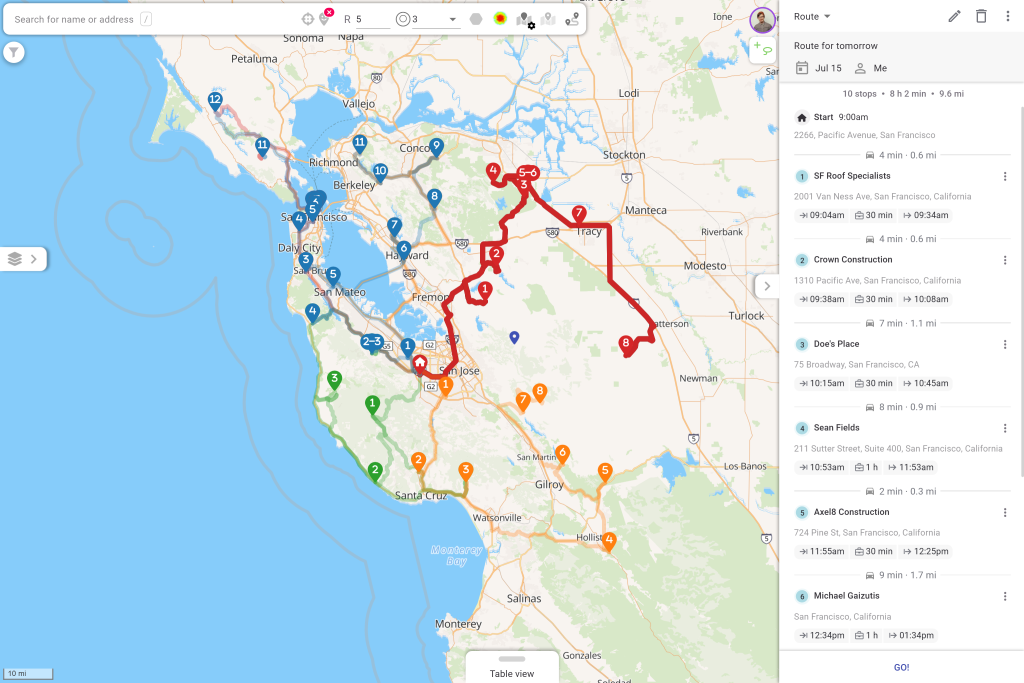
Airtableデータから最適化されたルートを計画
これは Airtable にはまったくできない部分です。訪問したいレコードを選択すると (地図の投げ縄、フィルター、またはレコードのシングルクリックで)、Mapsly がリアルタイムおよび過去の交通情報を使用して、最も効率的なルートに順序付けします。
チーム全体の計画。 フィールドチーム全体で利用できる、複数日・複数ユーザー対応のルート。
現実世界の制約. タイムウィンドウ, 営業時間, ジョブ所要時間, 必要なスキル, 車両制限.
すべての移動モード。 車、トラック、自転車、徒歩に対応し、トラック規制によりドライバーが不適切な道路を通行しないようにします。
長距離対応で、カレンダーを考慮. 夜間休憩を含むルート, および CRM、Google Calendar、Outlook の既存の会議に合わせて組み込める新規訪問.
Airtableベースからテリトリーを管理
地図上にテリトリーを描画するかインポートし, Mapsly が Airtable レコードと担当者を適切なエリアに自動割り当てできるようにします。ベースが変更されると割り当ても追従し, 手動で並べ替えなくてもカバレッジのバランスが保たれます。
フィールドワークを自動化, コード不要
Mapslyには現場で起きたことに反応するノーコード自動化スイートが含まれています. チェックイン, フォーム送信, またはAirtableフィールドの変更をトリガーにワークフローを開始し, レコードを更新し, マネージャーに通知し, または次のステップを自動的に起動します. 開発者は不要です.
現場へ持ち出す
Mapslyのモバイルアプリは、計画を行動に変えます。担当者は最適化されたルートをナビゲートし、訪問先でチェックインとチェックアウトを行い、設定可能なフォームで必要なデータを正確に取得します。記録した内容はリアルタイムで拠点に戻り、マネージャーはライブ位置情報と計画-vs-実績のパフォーマンスを確認できます。
Airtable と Mapsly の同期を維持する仕組み
Mapsly は Airtable のテーブルとフィールドを複製し、新規または更新されたレコードは Airtable からリアルタイムで取得されます。現場で行われた変更はベースに書き戻されるため、マップとルートは常にテーブルに実際にある内容を反映します。Airtable は引き続き信頼できる唯一の情報源であり、Mapsly はその周囲にある地理情報および現場実行レイヤーです。
Airtableデータを地図上に表示する方法
1. 接続. Airtable ベースを Mapsly にリンクします。Mapsly がテーブルとフィールドを数分で複製します。
2. マップ. Mapsly は住所を自動的にクリーンアップしてジオコードし, その後レコードを地図上にプロットします.
3. ルート. レコードを選択して、最初の最適化されたルートを作成します。
4. 拡張. テリトリーを描画し, チェックインフォームを設定し, 作業を進めながら自動化を追加します.
FAQ
Airtable にはマップビューがありますか?
はい. Airtable には、独自の Google Maps API キーを使用してレコードをピンとしてプロットするネイティブの Map 拡張機能があります. ただし、表示専用です: ルートの最適化、テリトリーの管理、変更の同期は行いません. それらには、Mapsly のようなマッピングレイヤーが必要です.
Airtable のデータを Google Maps に表示できますか?
住所を手動で Google Maps にコピーできますが、約10件の訪問先が上限で、現場での1日全体を最適化できず、ベースとの同期も維持されません。Mapsly は Airtable のレコードを直接地図上に表示し、リアルタイムで最新の状態に保ちます。
Airtableからルートを計画できますか?
はい。Mapsly を使用すると、ライブ交通情報、時間枠、スキルや車両の制約を考慮しながら、Airtable レコードから直接、複数の訪問先と複数日にわたる最適化されたルートを作成できます。
Airtableには組み込みのルート最適化機能がありますか?
いいえ. Airtable のネイティブマップはピンのみを表示します. ルート最適化には Mapsly のような外部レイヤーが必要で、コードなしで追加できます.
Airtableデータを自動的に地図上に表示するにはどうすればよいですか?
Airtable ベースを Mapsly に接続すると、テーブルとフィールドが複製され、その後、住所がクリーンアップおよびジオコーディングされ、通常は数分以内にレコードがインタラクティブマップ上に表示されます。
MapslyのAirtable連携はノーコードですか?
はい。Airtable の接続、レコードのマッピング、ルートの作成、自動化の設定はすべて、コードを一切書かずに行えます。
ご自身の Airtable データで確認してみませんか? 簡単なセッションを予約 当社のソリューションエンジニアと.