Mapsly vs SalesRabbit

More Than a Sales App: Mapsly Runs the Field.

SalesRabbit is the canvassing app; Mapsly is the platform that routes, automates, and scales the whole field team.

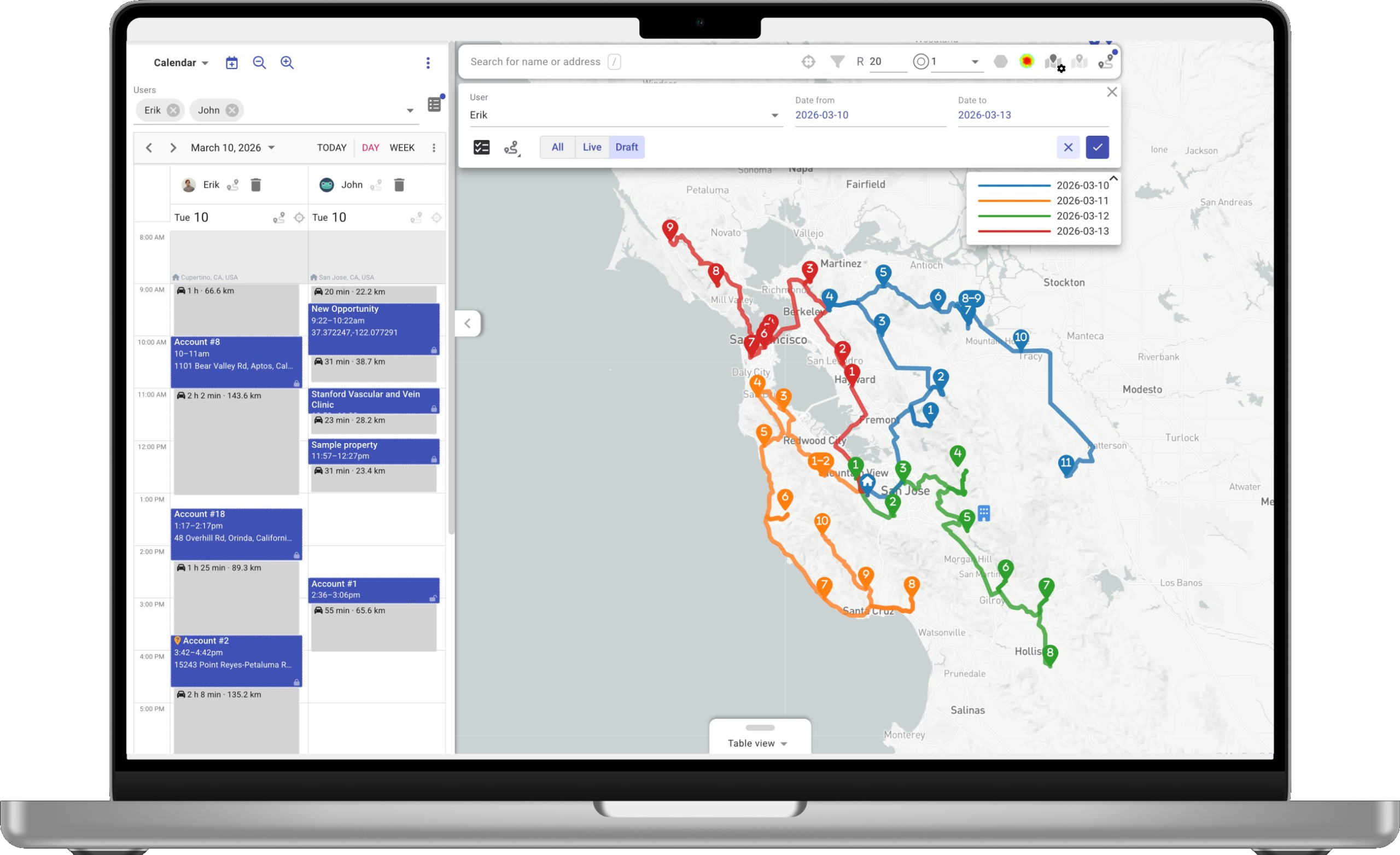
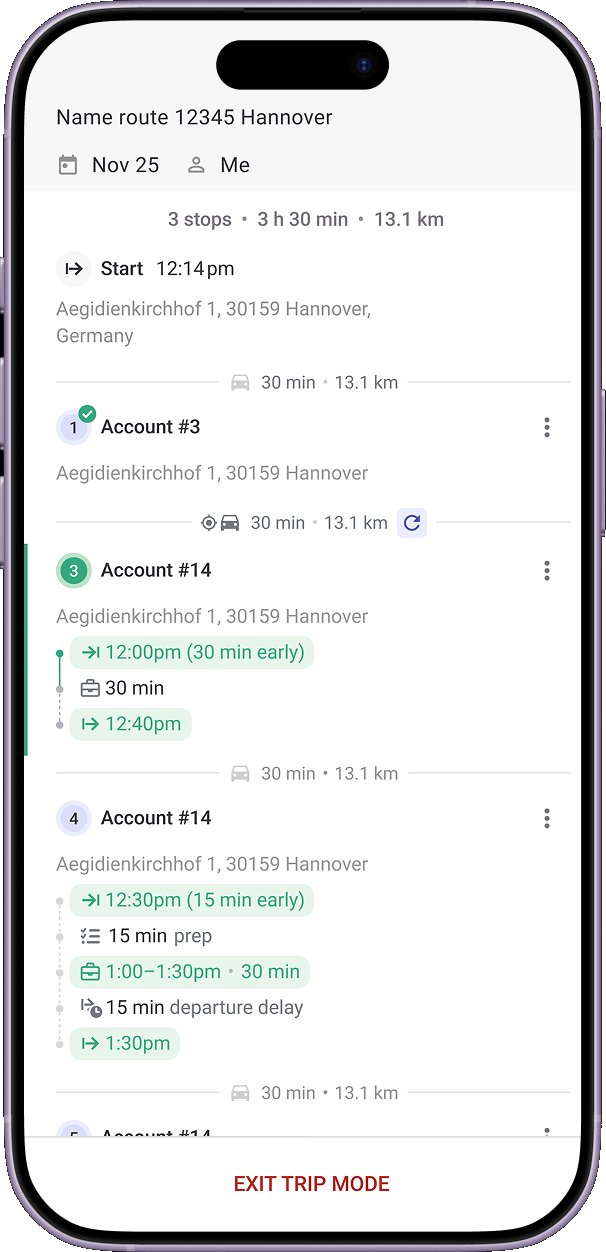
Mapsly on laptop Mapsly mobile route
Multi-rep, multi-day routing in one run
Offline maps & CRM data on iOS and Android
Free trial + implementation included
At a Glance

Side-by-Side Snapshot.

Verbatim caps from SalesRabbit’s public documentation, footnoted at the bottom of the page—next to what ships with Mapsly.

Capability
SalesRabbit Door-to-door sales app
Mapsly Field-ops platform
Routage
Stops per planning run
Up to 23 waypoints per route1
Thousands of stops—the whole team in one run
Routes for the whole team
Each rep routes only their own leads2
Every rep planned in one run
Multi-day planning with recurring cadences
Capacity, skills, and open hours in the optimizer
Appointments reordered by hand1
Route planning on the web
Mobile app only3
Full web platform + native apps
Field operations
Native iOS and Android apps
Offline data scope
Create and edit leads; buyer-score pins need a connection4
Offline maps + CRM data, built in
Field capture: photo, video, e-signature, barcode / QR
Forms on Pro; e-signature is a paid add-on5
Photo · video · e-signature · barcode / QR
Territoires
Territory creation
Hand-drawn areas—the vendor suggests 3–5 blocks each6
Draw, import, postal-code and county libraries—worldwide
KML / GeoJSON / Shapefile import
KML / KMZ as display-only overlays, 10 MB cap7
All three—as live territories
Demographic balancing (American Community Survey)
Platform & extensibility
Automation engine
Status-triggered pushes, webhooks, and Zapier—Pro plan8
Context- and metadata-driven automation
Applications personnalisées
Built for you by a Mapsly solution engineer—included
Custom fields
Text capped at 30 characters—Pro plan9
Every field, any type, mirrored automatically
Analytique
Amplify boards; gamification on Pro10
40+ chart types · SQL · no per-report cap
Embedded maps in your CRM or portal
Service & commercial
Free trial
No free trial of paid plans—a free Lite app instead11
Free trial of the full platform
Implementation
A paid implementation package is always required11
Solution engineer builds your setup—included
Add-on pricing
Buyer scores, weather, e-signature, mover leads—per user, billed account-wide12
Platform capabilities included
Supported CRMs
Event-push connectors on Pro; Salesforce needs Enterprise edition or higher13
15+ CRMs · two‑way sync · no lock‑in
The Mapsly Model

Two Models of a Field Platform.

Three places the products diverge—each with SalesRabbit’s own words underneath.

Try It Free. Implementation Included.

Mapsly ships a self-serve free trial of the full platform—plus a solution engineer who runs onboarding and a proof of concept inside the subscription. No implementation fee, no one- to three-year contract to sign first.

SalesRabbit

“Is an implementation package always required? — Yes. Our implementation packages include getting a new account set up and launched, which is an expensive process…”

source

Automation + Custom Apps, One Engine.

Context- and metadata-driven automation—geofence and schedule triggers, conditions on your records and relationships—and the same engine powers custom apps a Mapsly solution engineer builds for you, included.

SalesRabbit

Automation on SalesRabbit runs through its Zapier integration—“Integrate - Automate - Innovate (Available on SalesRabbit pro plan only)”—pushing lead data to outside apps.

source

Operations Planning at Team Scale.

Mapsly plans the whole field operation in one run—every rep, multiple days, thousands of stops—with capacity, skills, and open hours. Routing is one capability of the platform, not the product.

SalesRabbit

“Users manage their own routes. Routes cannot be created for other users”—and “a single route can only include up to 23 waypoints/stops.”

source
The Platform Layer

The Platform Layer SalesRabbit Doesn’t Ship.

Six surfaces included with Mapsly—on SalesRabbit’s side, undocumented on public surfaces or sold as an add-on.

Custom Apps

Dispatch widgets, delivery apps, store locators, route timelines—built for your operation by a Mapsly solution engineer on the platform’s own engine, at no extra cost.

Inclus with the platform

Automatisation

Context- and metadata-driven logic against your records, fields, and relationships—geofence entry, schedule triggers, distance conditions, CRM updates, and notifications.

Any trigger · any action

Multi-Source · Multi-Object

Route and read any object your CRM exposes—accounts, contacts, deals, custom objects—across multiple sources at once, with a self-healing metadata mirror.

15+ CRMs

Analytique

Drag-and-drop dashboards over route, check-in, and live CRM data—40+ chart types and direct SQL for anything bespoke, with no per-report cap.

40+ chart types

Embedded Maps

Put the live map inside your CRM or customer portal—reps and partners work where they already are, no extra tab.

CRM & portal

Offline-First Mobile

Native iOS and Android apps with offline maps and CRM data—capture photos, video, e-signatures, and barcode / QR in the field, syncing when back online.

iOS + Android

The Optimizer Makes the Difference.

SalesRabbit’s Route It reorders a rep’s own waypoints on the phone—up to 23 stops per route, with appointments moved by hand.1 Mapsly solves the traveling-salesman problem at team scale—thousands of stops across every rep and multiple days, with capacity, skills, and open hours.

Whole-team runsEvery rep planned in one pass
Less drive timeTighter sequences, fewer miles
Real constraintsCapacity, skills, and open hours
In Their Words

Customer Stories From Field Teams.

“Last week, we remapped our entire sales force in just two days. Before, that would have taken us about deux semaines.”

BR
Billy Reagin
National Sales Manager · Fox Factory
Read the Fox Factory case study

“Before, planning a route took 1–2 hours. With Mapsly it takes 10–15 minutes and we’re ready for the next day.”

GL
Gabriel Lussier
Go-to-market lead · Cisolift
Read the Cisolift case study

“Mapsly boosted our team’s productivity by +200%, far beyond our expectations.”

EL
Erick Lindenberg
Zeitview · field service operations
Read the Zeitview case study
Field-Team ROI

What Customers Report After Using Mapsly.

Two views: outcomes Mapsly users report from their own field teams, and what the ROI calculator projects for a sample 15-rep team.

Reported by Mapsly customers Field-team outcomes from the Mapsly customer base.
20%
more service stopssame team
60%
less time planningroutes per week
more data per visitsame rep time
Projected by the ROI calculator Modeled annual results for a 15-rep field team—adjust every input in the live calculator.
Net Annual Value
$100K+
Gas savings + freed-up time − Mapsly annual cost for a typical 15-rep team
Heures libérées
2,000+
For the entire team, annually
Return Multiplier
10×+
Return on Mapsly investment—see your number with the live calculator
Plug in your own numbers: Open the ROI calculator
Based on SalesRabbit’s public website and documentation as of June 2026—may contain errors. Spotted something? Email [email protected].
FAQ

Common Questions

Talk to the team

Yes—Mapsly offers native two-way sync with Salesforce, HubSpot, Zoho, Pipedrive, Microsoft Dynamics 365, and other major CRMs, plus spreadsheets and custom sources via REST API. SalesRabbit’s connectors push lead data on form submission or status change, are gated to the Pro plan and above, and the Salesforce connector requires Salesforce Enterprise edition or higher.13
SalesRabbit documents a cap of 23 waypoints per route, each rep can route only their own leads, and appointment ordering is a manual drag.12 Mapsly optimizes the whole team in one run—thousands of stops, every rep, multiple days—with capacity, skills, and open hours in the optimizer.
For high-volume door-to-door canvassing it genuinely is—gamified leaderboards and battles, machine-learning buyer scores, new-mover leads, and storm data are purpose-built for that motion. Mapsly is built for teams that run scheduled field operations on CRM data: multi-rep routing, territories, automation, custom apps, and analytics on one platform, on the CRM you already use. If your team is outgrowing knock tracking, that’s the switch point.
SalesRabbit publishes per-user prices—Team at $59 monthly, Pro at $49–75 depending on billing cycle—but the full cost adds per-user add-ons billed account-wide (DataGrid AI and Weather $19–31, Digital Contracts and Mover Leads $13–20), a required implementation package, and a one- to three-year contract.1112 Mapsly’s pricing is public at mapsly.com/pricing, implementation is included, and the trial is free. Run both numbers for your team size and add-ons.
DataGrid AI is real—machine-learning buyer scores for homes and neighborhoods. It’s a paid add-on at $19–31 per user per month, works on the mobile app only, and generates up to 3,000 pins per area.1214 Mapsly’s prospecting works from your CRM data plus American Community Survey indicators on web and mobile, and Mapsly’s AI assistant—voice to text, voice to action, conversational analytics—is on the roadmap (coming soon). Today, Mapsly’s edge is the shipped platform underneath: routing at team scale, Automation + Custom Apps, and analytics without caps.
On SalesRabbit, routing, DataGrid AI, weather overlays, and push notifications are documented as mobile-app capabilities; the web app covers administration, the web map, lead lists, and exports.3 Mapsly is a full web platform and a native field app—managers plan, balance territories, and build dashboards in the browser while reps run the same data on iOS and Android, including offline.
Yes. Start the free trial alongside your current setup—nothing to rip out—and a Mapsly solution engineer configures your CRM connector, imports your data, and builds your first workflow and custom app inside the subscription.
Sources & Notes

Footnotes

Where SalesRabbit is marked unavailable (✗), we found no public documentation of that capability as of June 13, 2026. If we missed something, email [email protected].

  1. Route cap and manual appointment ordering. SalesRabbit Help Center, “5. Routing Leads - Mobile App”: “a single route can only include up to 23 waypoints/stops”; for appointments, users “select an existing waypoint and move it up or down the list of waypoints to reorder in case of existing appointments/go back times.” Retrieved June 13, 2026. help.salesrabbit.com · Routing Leads
  2. Single-rep routing. Same article: “Users manage their own routes. Routes cannot be created for other users.” Corroborated in “Lasso - iOS”: “Users are only able to route for leads they own.” Retrieved June 13, 2026. help.salesrabbit.com · Lasso
  3. Mobile-only capabilities. SalesRabbit’s platform-comparison help article assigns Routes, DataGrid AI, Weather, and Push Notifications to mobile, with the web app covering the admin portal, web map, lead lists, and exports; routing is documented only in the mobile-app articles. Retrieved June 13, 2026. help.srplus.salesrabbit.com · SalesRabbit vs SalesRabbit Core
  4. Offline limits. SalesRabbit Help Center, “Offline Mode”: leads can be created and edited offline, but “You cannot populate DataGrid information unless you are connected to the internet,” and after reconnecting users should “allow 1-5 minutes for the data to sync.” Retrieved June 13, 2026. help.salesrabbit.com · Offline Mode
  5. Forms and e-signature gating. SalesRabbit Help Center: “The Form Builder is only available for Pro and Enterprise accounts”; “Digital contracts are an add-on, only available to Pro/Enterprise accounts.” Digital Contracts is priced at $13–20 per user per month on the pricing page. Retrieved June 13, 2026. help.salesrabbit.com · Digital Contracts Set Up
  6. Territory model. SalesRabbit Help Center, “5. Area Settings & Assignments - Web”: areas are drawn by hand and assigned to reps; the vendor advises “Avoid assigning entire cities; do assign 3-5 blocks per Area.” Retrieved June 13, 2026. help.salesrabbit.com · Area Settings
  7. Boundary files. SalesRabbit Help Center, “Uploading Map Overlays”: “the Map Overlays feature works with KML or KMZ formatted files” et “The max file size for a map overlay file is 10 MB”; overlays are display layers, not assignable territories. GeoJSON and Shapefile do not appear in SalesRabbit’s public help documentation. Retrieved June 13, 2026. help.salesrabbit.com · Uploading Map Overlays
  8. Automation model. SalesRabbit’s documented automation surfaces are status-triggered integration pushes, subscription webhooks, and Zapier—“Integrate - Automate - Innovate (Available on SalesRabbit pro plan only)”; no native automation builder appears in the public documentation. Retrieved June 13, 2026. help.salesrabbit.com · Zapier Overview · Subscription Webhooks
  9. Custom fields. SalesRabbit Help Center, “4. Custom Lead Fields - Web”: “Custom Lead Fields are only available on the Pro Plan”; “Text: Allows any text up to 30 characters long”; “Dropdown: Allows for 15 options up to 45 characters each.” Retrieved June 13, 2026. help.salesrabbit.com · Custom Lead Fields
  10. Analytics gating. SalesRabbit’s pricing page: “Analytics included in SalesRabbit Team plan • Analytics & Gamification included in SalesRabbit Pro & Enterprise plans.” Scheduled report delivery and business-intelligence integrations do not appear in the public documentation. Retrieved June 13, 2026. salesrabbit.com/pricing
  11. Trial, implementation, and contracts. SalesRabbit’s pricing FAQ: “We don’t support a free trial of our paid plans, but we do offer a free version of our app: SalesRabbit Lite”; “Is an implementation package always required? — Yes”; “we do contracts from one to three years”; no mid-cycle refunds. Retrieved June 13, 2026. salesrabbit.com/pricing
  12. Add-on pricing. SalesRabbit’s pricing page lists DataGrid AI and Weather at $19 (annual) to $31 (monthly) per user per month, and Digital Contracts and Mover Leads at $13–20. The billing FAQ states add-ons “will apply to all users’ licenses.” Retrieved June 13, 2026. salesrabbit.com/pricing · Billing FAQ
  13. CRM connectors. SalesRabbit Help Center: the Salesforce and HubSpot integrations are “only available to customers on SalesRabbit’s Pro or Enterprise membership plans”; Salesforce requires “Enterprise Edition, Unlimited Edition, Developer Edition, [or] Performance Edition”; connectors fire on form submission and lead-status change. Retrieved June 13, 2026. help.salesrabbit.com · Salesforce Overview
  14. DataGrid AI scope. SalesRabbit Help Center: “DataGrid AI information is only available on the mobile app and not on the web app”; “Each area can generate a total of 3,000 DataGrid AI pins.” SalesRabbit’s DataGrid page describes the model as machine learning and, asked “Is DataGrid AI an LLM (Large Language Model) like ChatGPT?”, answers “No, LLMs are designed for language-related tasks such as text generation, comprehension, summarization, and translation.” Retrieved June 13, 2026. help.salesrabbit.com · Area Settings · salesrabbit.com/datagrid