Mapsly vs Maptive

Maptive Makes the Map. Mapsly Runs the Field Operation.

While Maptive turns spreadsheets into maps in a browser, Mapsly puts the map to work—routing, syncing, and automating the whole field team.

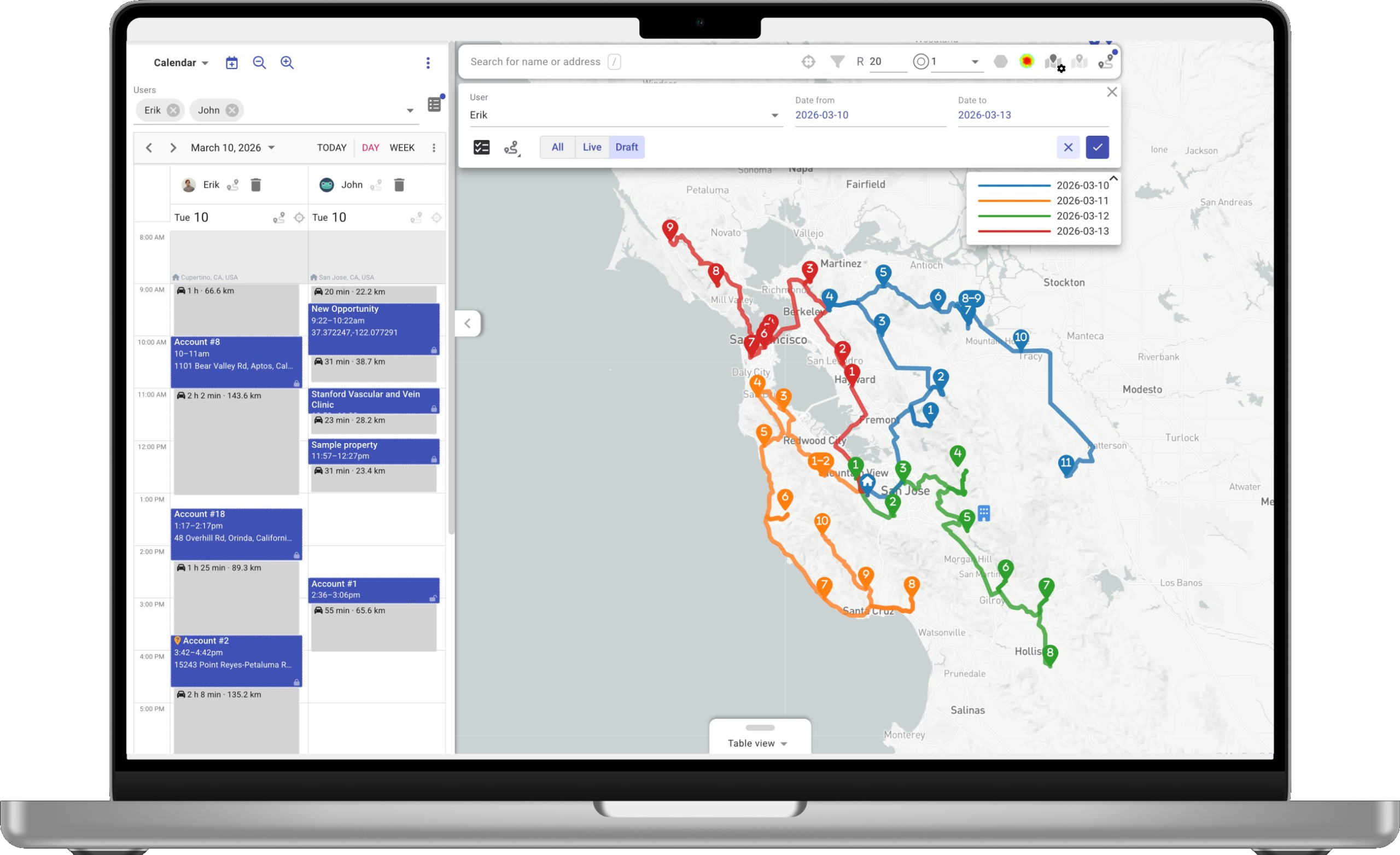
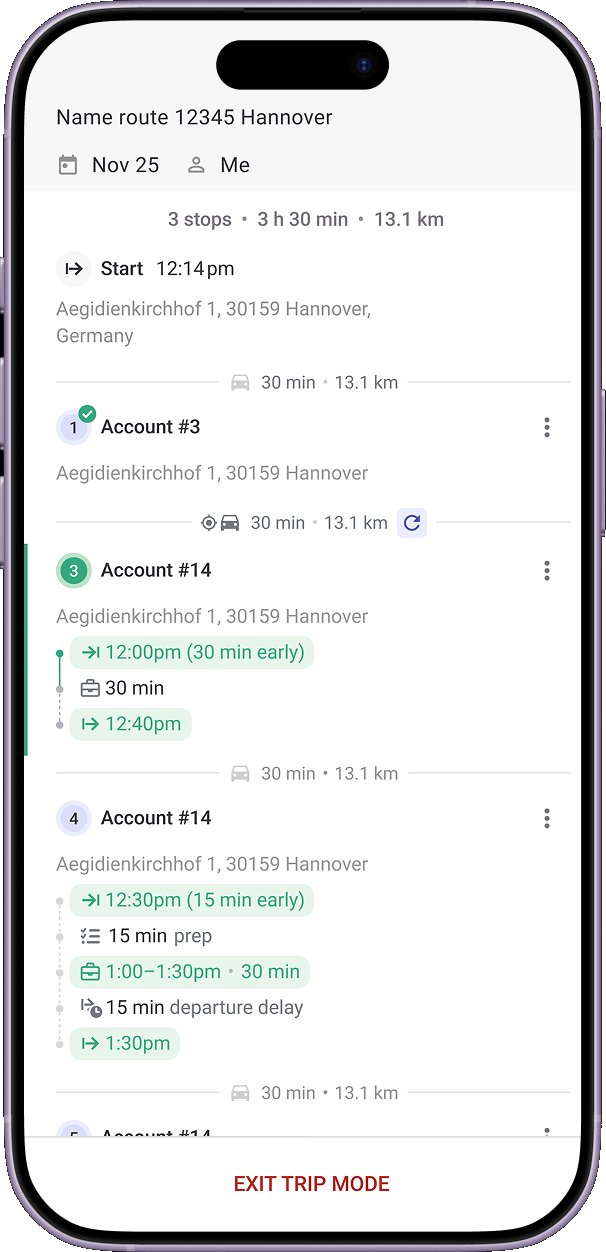
Mapsly on laptop Mapsly mobile route
Native iOS and Android apps with offline mode
Live two-way CRM sync across 15+ CRMs
Multi-rep, multi-day routing in one run
At a Glance

Side-by-Side Snapshot.

Verbatim capabilities and caps from the public Maptive website and Answer Center, footnoted at the bottom of the page—next to what ships with Mapsly.

Capability
Maptive Mapping software
Mapsly Field-ops platform
Routen
Stops per planning run
“Best route across up to 70 stops”1
Thousands of stops—the whole team in one run
Routes for the whole team
One driver per optimized route—built one at a time2
Every rep planned in one run
Multi-day planning with recurring cadences
Capacity, skills, open hours, and visit priorities in the optimizer
Re-optimize stops on the road
Field operations
Native iOS and Android apps
Native iOS + Android apps
Offline maps, notes, and record edits
Offline maps + CRM data, built in
Field capture: photo, video, e-signature, barcode / QR
Photo · video · e-signature · barcode / QR
Dynamic check-in forms
Dynamic check-in forms—built for your workflow
Territorien
Territory drawing and automated balancing
Automated Territory Creator—balanced territories from your variables5
Included—drawing, assignment, and balancing with metrics
Demographic overlays for balancing
“50+ US Census variables”5
US Census & more—balance on real population data
KML / GeoJSON / Shapefile import
Imports are Excel, CSV, and Google Sheets6
All three—plus county and postal-code libraries
Platform & extensibility
Live CRM connectors
HubSpot “Coming Early 2026” · Salesforce “Coming soon”7
Salesforce, Microsoft Dynamics, and more—live today
Two-way, real-time CRM sync
One way—your CRM pushes to the map via API8
Two-way sync—every field mirrored automatically
Automation engine
Context- and metadata-driven automation
Benutzerdefinierte Apps
Built for you by a Mapsly solution engineer—included
Analytics dashboards and scheduled reports
40+ chart types · SQL · no per-report cap
REST API and webhooks
API key by emailing support—no public docs or webhooks8
REST, webhooks, API—included
Embedded and shared public maps
HTML embed—1,500–5,000 public views per day by plan9
Embedded maps in your CRM or portal—included
Service & commercial
Data capacity
50,000–100,000 locations per data set—plus geocode and map caps by plan10
Scales with your connected sources
Free trial
10 days10
Free trial of the full platform
Implementation
Dedicated Support Manager—Team and Enterprise plans10
Solution engineer builds your setup—included
Supported CRMs
Connectors in development—HubSpot, Salesforce, Zoho, Pipedrive7
15+ CRMs · two‑way sync · no lock‑in
The Mapsly Model

Two Models of a Field Platform.

Three places the products diverge—each with Maptive’s own words underneath.

Operations Planning at Team Scale.

Mapsly plans the whole field operation in one run—every rep, multiple days, thousands of stops—with capacity, skills, open hours, and visit priorities. Routing is one capability of the platform, not a map tool.

Maptive

“Route Optimization: Best route across up to 70 stops.” The optimizer sequences one driver’s stops, keeping the first and last fixed; you can add more routes to a map, but each is built one at a time—splitting a stop list across reps is done by hand.

source

CRM Sync That’s Live Today.

Mapsly ships managed two-way connectors—Salesforce, Microsoft Dynamics, HubSpot, Zoho, Pipedrive, and more—mirroring every field automatically, plus REST, webhooks, and API for everything else.

Maptive

“Integrate your HubSpot Data Quickly and Easily with Maptive. (Coming Early 2026)”—and the Salesforce page says “(Coming soon).” Today, the documented path is an API key requested by email, pushing one way from CRM to map.

source

After the Map: Automation + Custom Apps.

Context- and metadata-driven automation—geofence and schedule triggers, conditions on your records and relationships—and the same engine powers custom apps a Mapsly solution engineer builds for you, included.

Maptive

Once the map is drawn, Maptive’s documented surface ends—no automation engine, dashboard builder, or custom-app platform appears in the public documentation. Connecting other systems runs through support: “please email us at [email protected].”

source
The Platform Layer

The Platform Layer Maptive Doesn’t Ship.

Six surfaces included with Mapsly—on Maptive’s side, undocumented on public surfaces or still marked “coming soon.”

Custom Apps

Dispatch widgets, delivery apps, store locators, route timelines—built for your operation by a Mapsly solution engineer on the platform’s own engine, at no extra cost.

Inbegriffen with the platform

Automatisierung

Context- and metadata-driven logic against your records, fields, and relationships—geofence entry, schedule triggers, distance conditions, CRM updates, and notifications.

Any trigger · any action

Multi-Source · Multi-Object

Route and read any object your CRM exposes—accounts, contacts, deals, custom objects—across multiple sources at once, with a self-healing metadata mirror.

15+ CRMs

Analytik

Drag-and-drop dashboards over route, check-in, and live CRM data—40+ chart types and direct SQL for anything bespoke, with no per-report cap.

40+ chart types

Two-Way CRM Sync

Managed connectors for Salesforce, Microsoft Dynamics, HubSpot, Zoho, Pipedrive, and more—live today, syncing both ways with a self-healing metadata mirror.

Live zweiseitige Synchronisierung

Offline-First Mobile

Native iOS and Android apps with offline maps and CRM data—capture photos, video, e-signatures, and barcode / QR in the field, syncing when back online.

iOS + Android

The Optimizer Makes the Difference.

Maptive’s optimizer sequences one driver’s stops—up to 70 per route, one route at a time.12 Mapsly solves the traveling-salesman problem at team scale—thousands of stops across every rep and multiple days, with capacity, skills, and open hours.

Whole-team runsEvery rep planned in one pass
Less drive timeTighter sequences, fewer miles
Real constraintsCapacity, skills, and open hours
In Their Words

Customer Stories From Field Teams.

“Last week, we remapped our entire sales force in just two days. Before, that would have taken us about zwei Wochen.”

BR
Billy Reagin
National Sales Manager · Fox Factory
Read the Fox Factory case study

“Before, planning a route took 1–2 hours. With Mapsly it takes 10–15 minutes and we’re ready for the next day.”

GL
Gabriel Lussier
Go-to-market lead · Cisolift
Read the Cisolift case study

“Mapsly boosted our team’s productivity by +200%, far beyond our expectations.”

EL
Erick Lindenberg
Zeitview · field service operations
Read the Zeitview case study
Field-Team ROI

What Customers Report After Using Mapsly.

Two views: outcomes Mapsly users report from their own field teams, and what the ROI calculator projects for a sample 15-rep team.

Reported by Mapsly customers Field-team outcomes from the Mapsly customer base.
20%
more service stopssame team
60%
less time planningroutes per week
more data per visitsame rep time
Projected by the ROI calculator Modeled annual results for a 15-rep field team—adjust every input in the live calculator.
Net Annual Value
$100K+
Gas savings + freed-up time − Mapsly annual cost for a typical 15-rep team
Freigewordene Stunden
2,000+
For the entire team, annually
Return Multiplier
10×+
Return on Mapsly investment—see your number with the live calculator
Plug in your own numbers: Open the ROI calculator
Based on the public Maptive website and documentation as of June 2026—may contain errors. Spotted something? Email [email protected].
FAQ

Common Questions

Talk to the team

Yes—Mapsly offers native two-way sync with Salesforce, HubSpot, Zoho, Pipedrive, Microsoft Dynamics 365, and other major CRMs, plus spreadsheets and custom sources via REST API—and it routes and reads any object the CRM exposes, with every field mirrored automatically. Maptive’s HubSpot connector is marked “Coming Early 2026” and its Salesforce connector “Coming soon”; the documented path today is an API key requested by email, pushing data one way from your CRM to the map.78
Maptive documents route optimization of up to 70 stops for a single driver, building one route at a time—splitting a stop list across several reps is done by hand.12 Mapsly optimizes the whole team in one run—thousands of stops, every rep, multiple days—with capacity, skills, open hours, and visit priorities in the optimizer.
Maptive has no app in the Apple App Store or Google Play—reps open the same web dashboard in a mobile browser, and offline use does not appear in the public documentation.34 Mapsly ships native iOS and Android apps with offline maps and CRM data—reps capture photo, video, e-signature, and barcode / QR in the field, and everything syncs when they’re back online.
Maptive Pro is $1,250 per year for one user license, with additional licenses at $750; Team is $2,500 per year with five user licenses, additional licenses at $500; and a 45 Day Pass is $250.10 Mapsly’s pricing is public at mapsly.com/pricing, and routing, territories, automation, custom apps, and analytics are platform capabilities—run both numbers for your team size and what each subscription actually covers.
Maptive’s territory and visualization tools are genuinely strong—an Automated Territory Creator, boundary building from states, counties, and ZIP codes, heat maps, and 50+ US Census variables.5 If a map for an analyst is all you need, it’s a capable choice. Mapsly matches the territory layer—drawing, assignment, balancing with metrics, and boundary import (KML, GeoJSON, Shapefile)—and adds what happens after the map: routing for the whole team, automation, native mobile capture, and live CRM sync.
Maptive’s plans cap locations per data set (50,000 on the 45 Day Pass; 100,000 on Pro and Team), total geocodes, daily imports, map counts, and public map views per day.10 Mapsly reads your records from the connected sources—CRMs, spreadsheets, custom data—and scales with them.
Yes. Start the free trial alongside your current setup—your data already lives in spreadsheets or your CRM—and a Mapsly solution engineer configures your CRM connector, imports your data, and builds your first workflow and custom app inside the subscription.
Sources & Notes

Footnotes

Where Maptive is marked unavailable (✗), we found no public documentation of that capability as of June 13, 2026. If we missed something, email [email protected].

  1. Route stop cap. Maptive route-planner, features, and pricing pages: “Route Optimization: Best route across up to 70 stops.” (Maptive’s FAQ and Answer Center tutorial still reference 73 stops; the current feature and pricing pages say 70.) Retrieved June 13, 2026. maptive.com · Route Planner · Preisgestaltung
  2. Single-driver routes. Maptive route-planner page: the optimizer keeps the first and last stops fixed and resequences the middle; “you can add as many routes as you need on a single map,” but each is built one route at a time, and mobile navigation hands off to the Google Maps app—“tap Open in Google Navigate.” Multi-driver or multi-day optimization in a single run does not appear in the public documentation. Retrieved June 13, 2026. maptive.com · Route Planner
  3. Mobile platform. Maptive Answer Center, “Working With Maps on Your Mobile Device”: on a phone you log in to “the same home dashboard screen” you see on a computer—the web app in a mobile browser, not a purpose-built field app. The FAQ frames it as “fully mobile-accessible through modern web browsers… without requiring app downloads”—and no Maptive app is listed in the Apple App Store or Google Play (store search, June 13, 2026). answers.maptive.com · Mobile Device · FAQ
  4. Offline. Maptive Answer Center, “Working With Maps on Your Mobile Device”: “Any changes you make while using Maptive from your mobile device will sync in real-time”—a connected workflow; offline use does not appear in the public documentation. Retrieved June 13, 2026. answers.maptive.com · Mobile Device
  5. Territory tools and demographics. Maptive features page: “Automated Territory Creator—Build balanced territories automatically”; “Demographic Overlays—Add Census income and age data.” Territory-management page: “50+ US Census variables at every geographic level.” Retrieved June 13, 2026. maptive.com · Features · Gebietsverwaltung
  6. Data import formats. Maptive FAQ: “Maptive accepts Excel files in both .xlsx and .xls formats, CSV files, and direct Google Sheets integration. You can also copy and paste data or drag and drop files.” KML, GeoJSON, and Shapefile import do not appear in the public documentation. Retrieved June 13, 2026. maptive.com · FAQ
  7. CRM connectors. Maptive HubSpot integration page: “Integrate your HubSpot Data Quickly and Easily with Maptive. (Coming Early 2026)”; Salesforce integration page: “Map your SalesForce Data Quickly and Easily with Maptive. (Coming soon).” The features page markets “Sync live data from your CRM,” while the connectors themselves remain unreleased—and as of June 2026, the “Early 2026” HubSpot target has now passed without a release. The /integrations/ URL returns a 404. Retrieved June 13, 2026. maptive.com · HubSpot Integration · Salesforce Integration · Maptive iQ
  8. API access. Maptive Answer Center Product FAQ: “Yes! You can connect any CRM database to your map using our API. For more information, please email us at [email protected].” API Access is listed from the Pro plan up on the pricing page; a public API reference and webhooks do not appear in the public documentation. Retrieved June 13, 2026. answers.maptive.com · Product FAQ · Preisgestaltung
  9. Map sharing and embedding. Maptive Answer Center: maps embed via copyable HTML code, with “Password Protected and Public” privacy options. The pricing page caps Public Map Views at “1,500/Day” (45 Day Pass), “3,500/Day” (Pro), and “5,000/Day” (Team and Enterprise). Retrieved June 13, 2026. answers.maptive.com · Embedding Maps · Preisgestaltung
  10. Plans, caps, and trial. Maptive pricing page: 45 Day Pass “$250 / 45 days”; Pro “$1,250/year billed annually” (1 user license, additional licenses $750); Team “$2,500/year billed annually” (5 user licenses, additional licenses $500); “Locations Per Data Set” of 50,000 (45 Day Pass) and 100,000 (Pro and Team), with separate caps on stored records, daily imports, total geocodes, map counts, and public map views; “Dedicated Support Manager” on Team and Enterprise. Homepage and FAQ: “Start a free 10-day trial,” no credit card required. Retrieved June 13, 2026. maptive.com · Pricing