


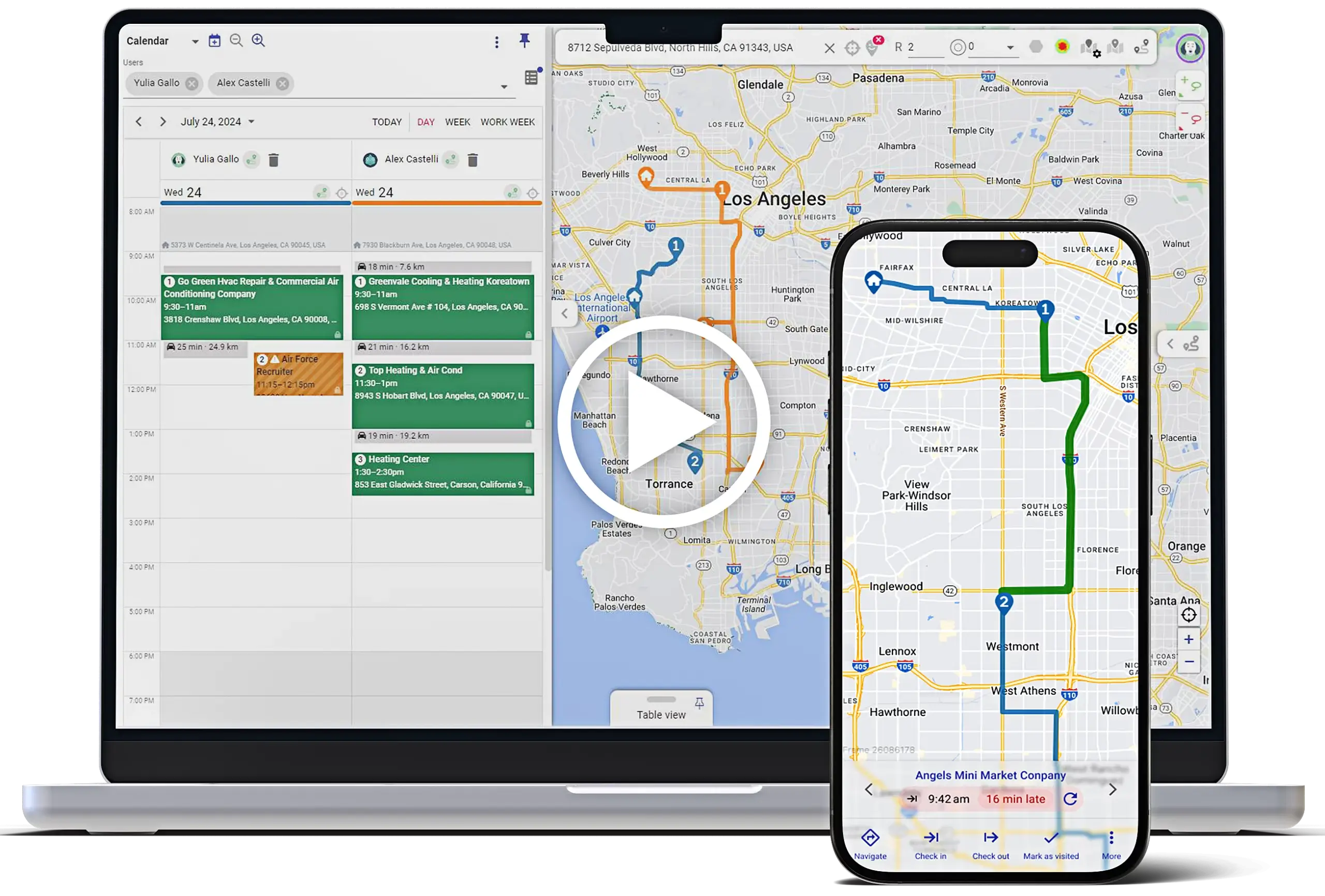


Boost field team productivity, drive more revenue, and improve service quality with best-in-class tools for routing, visit execution, territory design, and geo-targeted marketing.
Mapsly provides Zoho CRM users with a better experience when mapping and managing territories, ensuring improved efficiency and satisfaction.
Mapsly helps Zoho users plan smarter, act faster, and automate more—making Zoho CRM mapping easier and more efficient, all without writing a single line of code.
Equip your sales reps and service teams with optimized routes, automated check-ins, and mobile data collection—so they can visit more customer locations, plan visits efficiently, close more deals, and deliver consistent service
Reveal patterns, spot opportunities, and take action faster with interactive maps, filters, layers, and geo-analytics built directly on your Zoho CRM data—including custom modules.
Automate repetitive location-based tasks like lead assignment, follow-ups, or visit planning—freeing your team to focus on selling and serving, not admin work.
Use map-based territory planning and live dashboards to optimize sales territory management, ensure balanced workloads, identify gaps, and hold teams accountable—no spreadsheets or guesswork needed.
Unlock higher productivity and smarter decisions with location intelligence. Mapsly integrates seamlessly with Zoho CRM for real-time data synchronization, helping Zoho-based teams drive more revenue, reduce costs, and gain real-time visibility by transforming how they plan, operate, and analyze field activities.
Boost rep productivity with optimized routes, real-time CRM updates, and automated check-ins that increase daily visits and data quality. Easily manage and locate leads within Zoho CRM for more effective field operations.
Deliver faster, more reliable service with live technician tracking, smart rerouting, and mobile data capture—no clipboard needed.
Launch higher-ROI campaigns with precision targeting, territory-based segmentation, and full visibility into geo-driven funnel performance.
Visualize contacts, deals, and custom modules using address or GPS fields. Mapped records are shown on the map for easy visualization.
Segment data into layers or filters using field values or custom formulas. Sales reps can manage and visualize customer locations for better route planning.
Use unique icons, colors, and fonts for better visual clarity.
Choose which fields show on labels, popups, tables, or hovers.
Draw territories or generate them by zip codes, counties, or states.
Automatically assign leads or accounts to territories and sync to Zoho.
Search local businesses via Google Maps and add them to Zoho in clicks.
Calculate and sort records by proximity to any location.
Auto-calculate distances between records using workflows.
Find and link best-fit records using rules and rank formulas.
Edit records on the map or in bulk with real-time Zoho sync.
Build fastest routes with traffic, schedule, and vehicle settings.
Fix incomplete addresses and convert them to GPS automatically.
View and edit multi-select lookups natively — no code needed.
Auto-fill routes using Zoho CRM calendar meetings.
How Mapsly stacks up on routing, automation, integration, and field productivity
| Category | Mapsly | Zoho Analytics + RouteIQ | Google Maps |
|---|---|---|---|
| Mapping & Visualization | Advanced map with layers, filters, multi-object support | Basic maps, limited filtering | Navigation only |
| Route Optimization | Multi-day, multi-user, skill-, capacity- & cadence-aware | Basic, single-day, user-level only | Point-to-point only |
| Territory Management | Auto-assign, hand-draw or created from geo-library, demographic overlays. Roll-up metrics with your data. | In CRM, without visual shapes | Not supported |
| Embedded Navigation & Turn-by-Turn Directions | Uses external apps (e.g., Waze, Google Maps) | Integrated with Google Maps | Native navigation |
| Voice Input & Natural Language Search | Not supported | Limited via Google Maps widget | Fully supported |
| Automation & Workflows | Full no-code/low-code engine: buttons, forms, workflows, API callouts, custom scripting | Zoho CRM-based: workflows and Deluge functions. | Not applicable |
| Native Integrations | 15+ CRMs, real-time 2-way sync | Native to Zoho only | None |
| Customization | Fully customizable maps, UI, automations | CRM-driven limits | None |
| Pricing Transparency | Starting from $25, no implementation fees | Starting from $30 (Analytics) + $9 (RouteIQ) | Free |
| Support | 24/7 live chat, done-for-you setup | Limited to Zoho business hours | Self-service only |
| Ideal For | Teams needing advanced field ops, marketing, and service automation with Zoho CRM | Basic CRM map and single-user/single-day | Only for point-to-point with navigation |
Mapsly users can sign up to be notified about upcoming features, CRM integrations, and product updates.

Operations Manager
Mapsly is natively connected to your Zoho CRM—instantly syncing all your data (including custom modules) for real-time mapping, routing, territory planning, and workflow automation.
Mapsly offers the most powerful way to visualize and work with your Zoho CRM data—supporting custom modules, real-time sync, advanced filtering, route planning, and territory management, all with no coding required.
Easy! Just follow this setup guide.
No. The integration is plug-and-play and can be set up in just a few minutes using a step-by-step wizard.
Yes. Zoho CRM supports sales territories out of the box—but with Mapsly, you can visually draw territories on a map and automatically assign records to them based on geography. All updates stay in sync with Zoho CRM, so the two work seamlessly together.
Yes. Mapsly can assign leads to reps by territory, availability, or driving distance.
All standard and custom modules, fields, and records — including contacts, leads, accounts, deals, and custom objects — are synced bi-directionally between Zoho CRM and Mapsly.
Yes. Mapsly fully supports custom fields and modules in Zoho CRM, including multi-select lookups and custom object relationships.
Mapsly syncs with Zoho CRM automatically every 10 minutes. You can also trigger instant syncs manually or set up real-time updates via webhooks.
Yes. Mapsly is SOC2 Type 2, GDPR, HIPAA, and CCPA compliant, with data encryption at rest and in transit.
Yes. A 14-day trial with full feature access. No credit card required.
Yes. Zoho includes built-in mapping, routing, and territory tools. Where Mapsly stands out is in the depth and flexibility of those features—offering multi-day, multi-user routing, drawn territories with auto-assignment, and fully customizable workflows and automations beyond what Zoho natively supports.
Join thousands of teams using Mapsly to save time and reduce costs