Mapsly contra Salesforce MapsSalesforce Maps

More Field Visits.
Less Planning.
On Your Salesforce Data.

Routing, territories, live tracking, check-ins, and Mapsly AI—all on your Salesforce data.

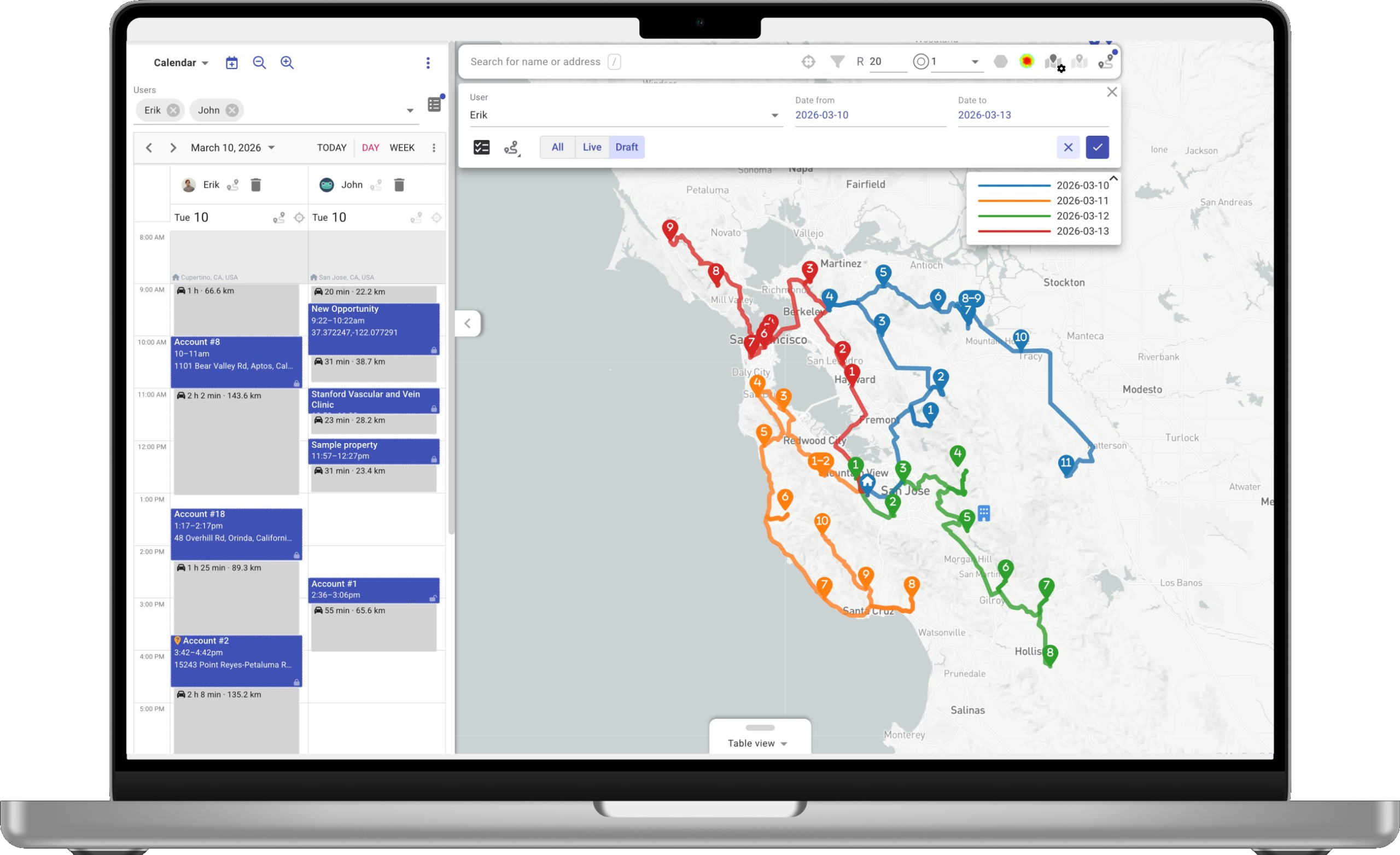
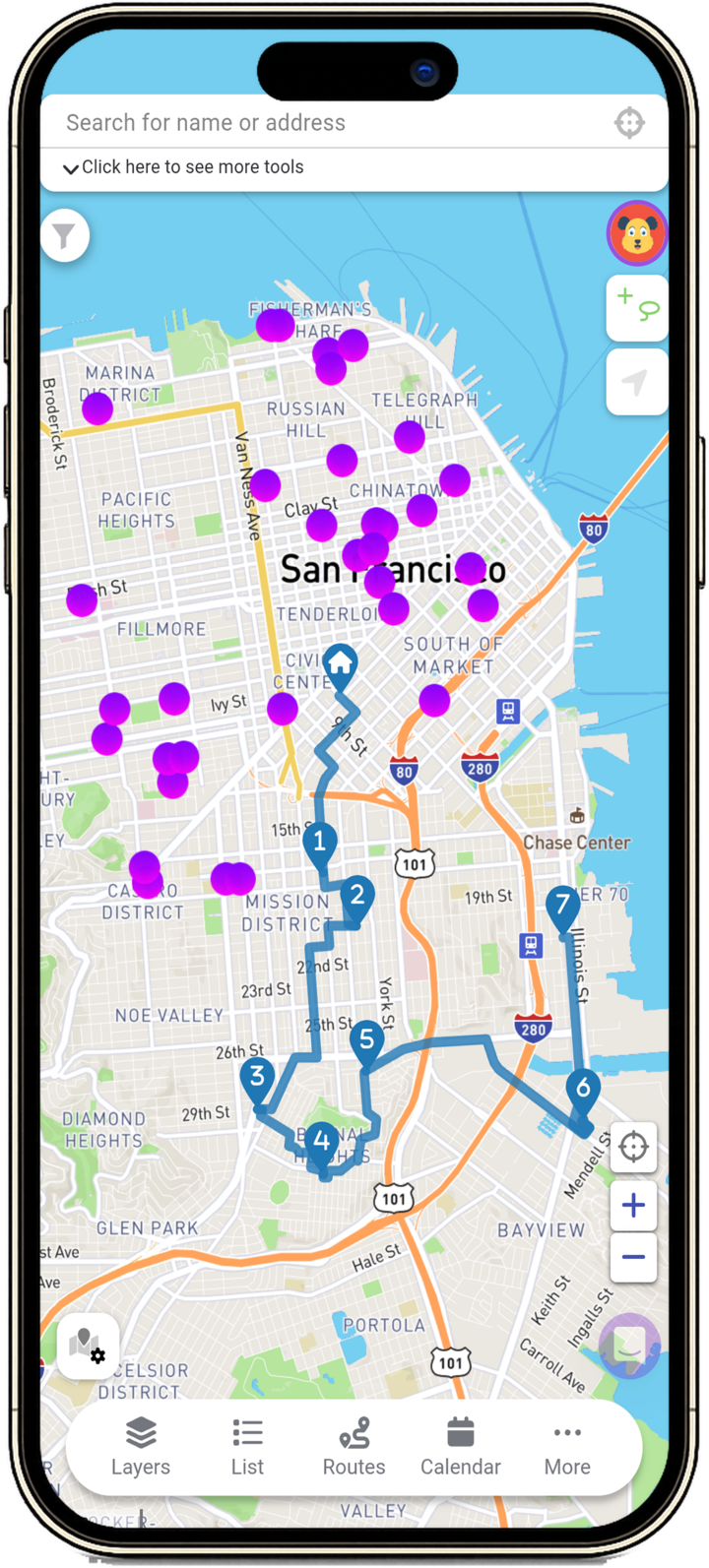
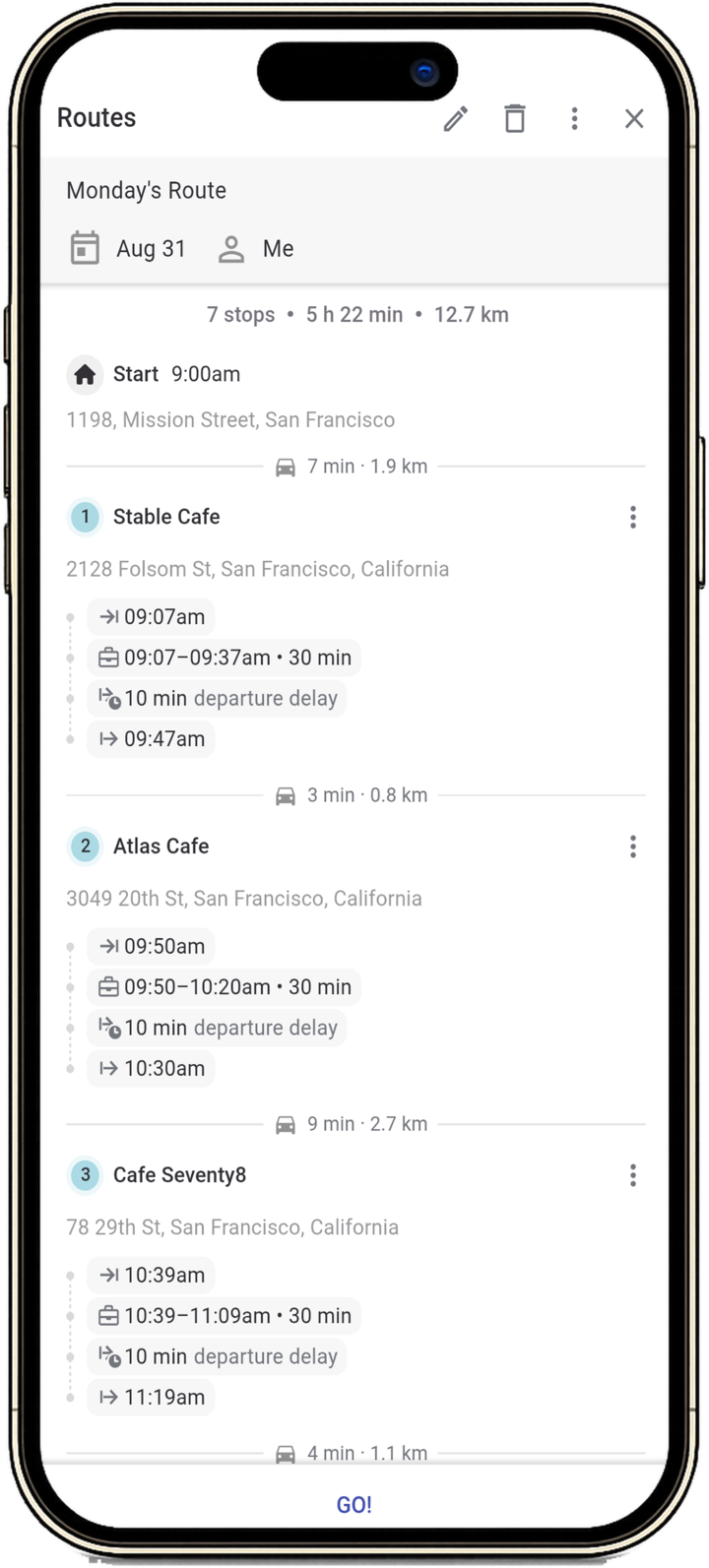
Mapsly no laptop Rota móvel do Mapsly
Roteirização para vários representantes e vários dias em uma única execução
Mapas offline & dados de CRM no iOS e Android
Territórios, análises, e automação—incluídos
Visão geral

Snapshot lado a lado

Salesforce's own documentation and pricing pages on the left, Mapsly on the right. Numbered markers link to the sources at the bottom of the page.

Capacidade
Salesforce MapsSalesforce MapsSales Cloud mapping add-on

MapslyPlataforma de operações de campo
Planejamento de rotas
Paradas por execução de planejamento
Up to 150 waypoints per route with traffic; 120 time-based3
Thousands of stops—the whole team in one run
Otimização para vários representantes em uma única execução
Maps Advanced visit plans generate per-rep routes5
Horizonte de planejamento
1 day (Routes) · 1 week (Schedule)4 · up to 3 months with Maps Advanced5
Cadências de vários dias, recorrentes
Capacidade, habilidades, horário de funcionamento, e pernoites no otimizador
Multi-source routing (CRM, spreadsheets, custom data)
Operações de campo
iOS and Android apps
Maps Mobile tab inside the Salesforce app; standalone app retired Aug 31, 20261
Mapas offline, notas, e edições de registros
Offline maps + CRM data, built in
Rastreamento de localização da equipe
Auto check-in and check-out on arrival
Captura em campo: foto, vídeo, assinatura eletrônica, código de barras / QR,
Activity fields via a Custom Disposition8
Photo · video · e-signature · barcode / QR
Check-in with distance verification
Territórios
Design e balanceamento de territórios
Territory Planning via the Sales Planning add-on—$75/user/mo11
Incluído—desenho, atribuição e balanceamento com métricas
Importação de KML / GeoJSON / Shapefile
KML only (5 MB); not usable for auto-assignment9
Todos os três—mais bibliotecas de condados e códigos postais
Dados demográficos para o balanceamento de territórios
Business, property, and demographic data layers10
50,000+ indicadores da American Community Survey, usados para equilibrar territórios
Atribuir registros automaticamente a territórios e representantes
Platform & Extensibility
Mecanismo de automação
Auto Assignment plans; Salesforce Flow on the platform12
Automação baseada em contexto e metadados
Geofence and arrival triggers for field workflows
Aplicativos personalizados
Built on the Salesforce Platform; partner Quick Starts $5,000–$10,00013
Criado para você por um engenheiro de soluções da Mapsly—incluído
Análises
Salesforce reports and dashboards
40+ chart types · SQL · no per-report cap
AI assistant in the field app (voice, briefs, follow-ups)
AI Visit Recommendations need Maps Advanced25 · assistants via Agentforce, sold separately23
Mapsly AI · private beta · every plan24
Service & Commercial
Teste gratuito
Free trial of the full platform—monthly or annual billing on every plan
Implementação incluída em todos os planos
Partner Quick Starts: $5,000 or $10,000 USD13
Um engenheiro de soluções cria sua configuração—incluído
Support included
Standard: self-service; Premier Success Plan at 30% of net license fees15
24/7 human chat on every plan
Preços públicos
$75 Maps · $125 Advanced, billed annually on a 12-month contract, plus a Salesforce license16
Publicado em mapsly.com/pricing
CRMs compatíveis
Salesforce only
15+ CRMs · multi-source · no lock-in
O modelo Mapsly

Keep Salesforce. Add the Field Layer.

Mapsly runs on top of your Salesforce data, so nothing migrates and nothing gets retired from under your reps.

No Migration. Two-Way Sync.

Mapsly ships managed two-way connectors—Salesforce, Microsoft Dynamics, HubSpot, Zoho, Pipedrive, and more—mirroring every field automatically, plus REST, webhooks, and API for everything else. Salesforce stays your system of record.

Salesforce MapsSalesforce Maps

Custom CSV location data in Salesforce Maps: “That capability was retired on May 16, 2025.”

fonte

The Mobile App, Included.

iOS and Android apps with offline maps and CRM data—capture photos, video, e-signatures, and barcode / QR in the field, syncing when back online—plus team location tracking and geofenced check-ins, included with the platform.

Salesforce MapsSalesforce Maps

“Salesforce will retire the standalone Salesforce Maps mobile app on August 31, 2026.”

fonte

Try for Free. Implementation Included.

Mapsly ships a self-serve free trial of the full platform—plus a solution engineer who runs onboarding and a proof of concept inside the subscription. No implementation fee, no 12-month contract to sign first.

Salesforce MapsSalesforce Maps

Salesforce Maps Quick Start Growth: “Price: $5,000 USD · Duration: 4 weeks.” Quick Start Plus: “$10,000 USD · 8 weeks.”

fonte
Os mesmos dados. Em cada dispositivo.

Plataforma web mais aplicativo móvel de campo.

Every Mapsly capability works in the web and mobile apps—multi-day routing with re-optimization, prospects along the route, dynamic check-in forms, the travel-aware calendar, and offline maps & CRM data.

plataforma web da MapslyRota móvel do Mapsly
A camada da plataforma

The Platform Layer Salesforce Maps Doesn't Ship.

Six surfaces included with Mapsly—on the Salesforce side, part of separately licensed platform products or sold as paid services.

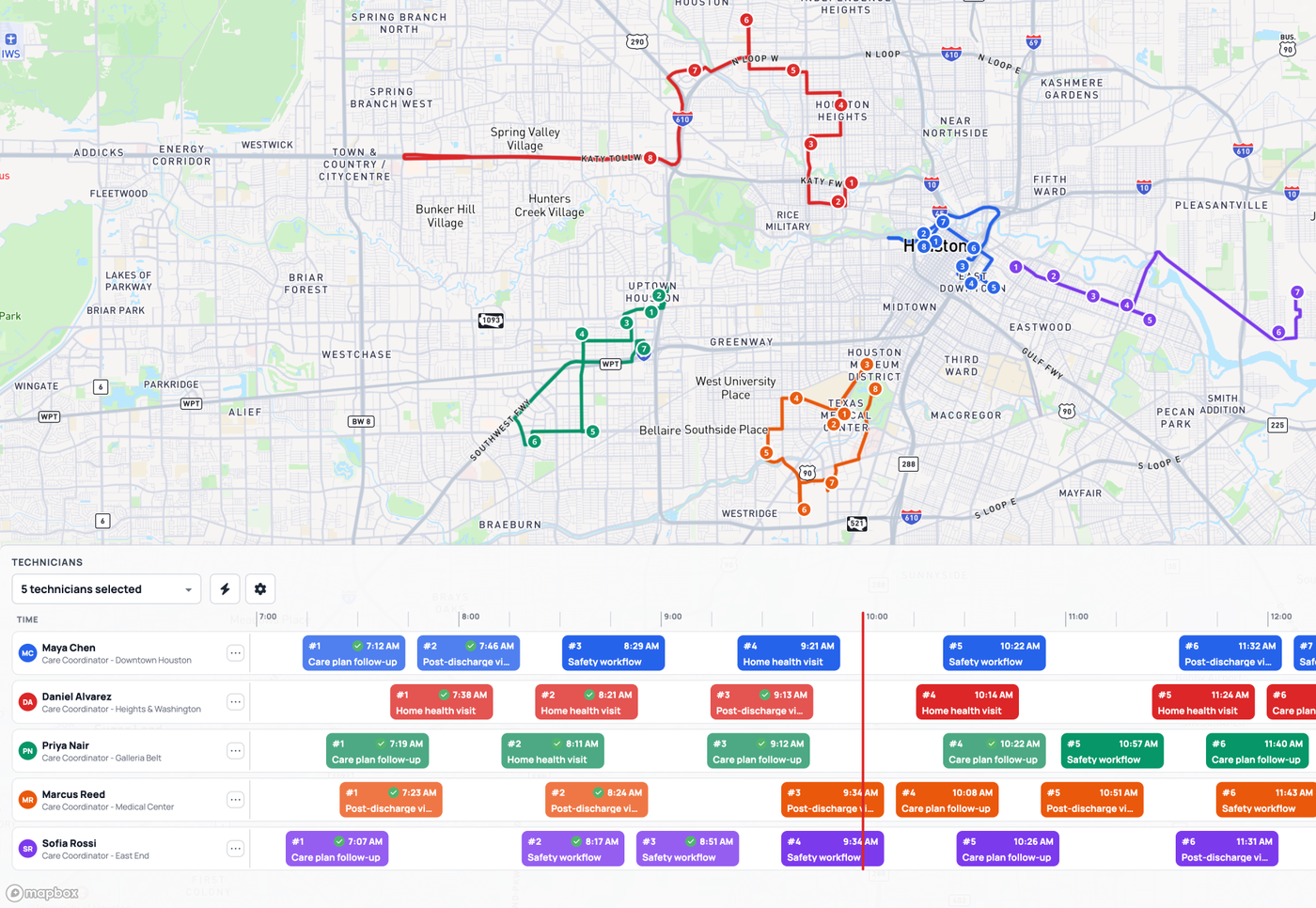
Roteamento em escala de equipe

Cada representante, vários dias, milhares de paradas em uma única execução de otimização—com capacidade, habilidades, horários de funcionamento e pernoites como restrições, não como considerações posteriores.

Toda a equipe

Mobile com prioridade offline

iOS and Android apps with offline maps and CRM data—capture photos, video, e-signatures, and barcode / QR in the field, syncing when back online.

iOS

Aplicativos personalizados

Widgets de despacho, aplicativos de entrega, localizadores de lojas, cronogramas de rotas—criados para sua operação por um engenheiro de soluções da Mapsly no próprio mecanismo da plataforma, sem custo adicional.

Incluído

Automação

Lógica orientada por contexto e metadados para seus registros, campos e relacionamentos—entrada em geocerca, gatilhos de agenda, condições de distância, atualizações de CRM e notificações.

Qualquer

Múltiplas fontes · Múltiplos objetos

Encaminhe e leia qualquer objeto que seu CRM expõe—contas, contatos, negócios, objetos personalizados—em várias fontes ao mesmo tempo, com um espelho de metadados autorrecuperável.

15+

Análises

Dashboards de arrastar e soltar sobre dados de rotas, check-ins e CRM em tempo real—mais de 40 tipos de gráficos e SQL direto para qualquer necessidade personalizada, sem limite por relatório.

40+
Lado a lado

O que cada ferramenta realmente faz

Plan the Whole Team, Not One Rep's Day.
Planejamento de rotas

Plan the Whole Team, Not One Rep's Day.

Mapsly optimizes multi-rep, multi-day routes in one run—up to 2,000 stops—with capacity, skills, open hours, and overnight stops.

Salesforce Maps
Single-day Routes and one-week Schedule: 150 waypoints with traffic, 120 time-based43
Maps Advanced ($125) visit plans generate routes for up to 3 months5
Vehicle capacity, skills, and overnight legs
Re-optimization from the rep's live position
Thousands of stops—the whole team in one run
Caminhões · Capacidade · Habilidades · Horário de funcionamento
Multi-day optimization with overnight stays and recurring visit cadences
Any object the CRM exposes—accounts, contacts, deals, custom objects
Reroutes unvisited stops from the rep's current location19
Territories You Can Import, Balance, and Assign.
Territórios

Territories You Can Import, Balance, and Assign.

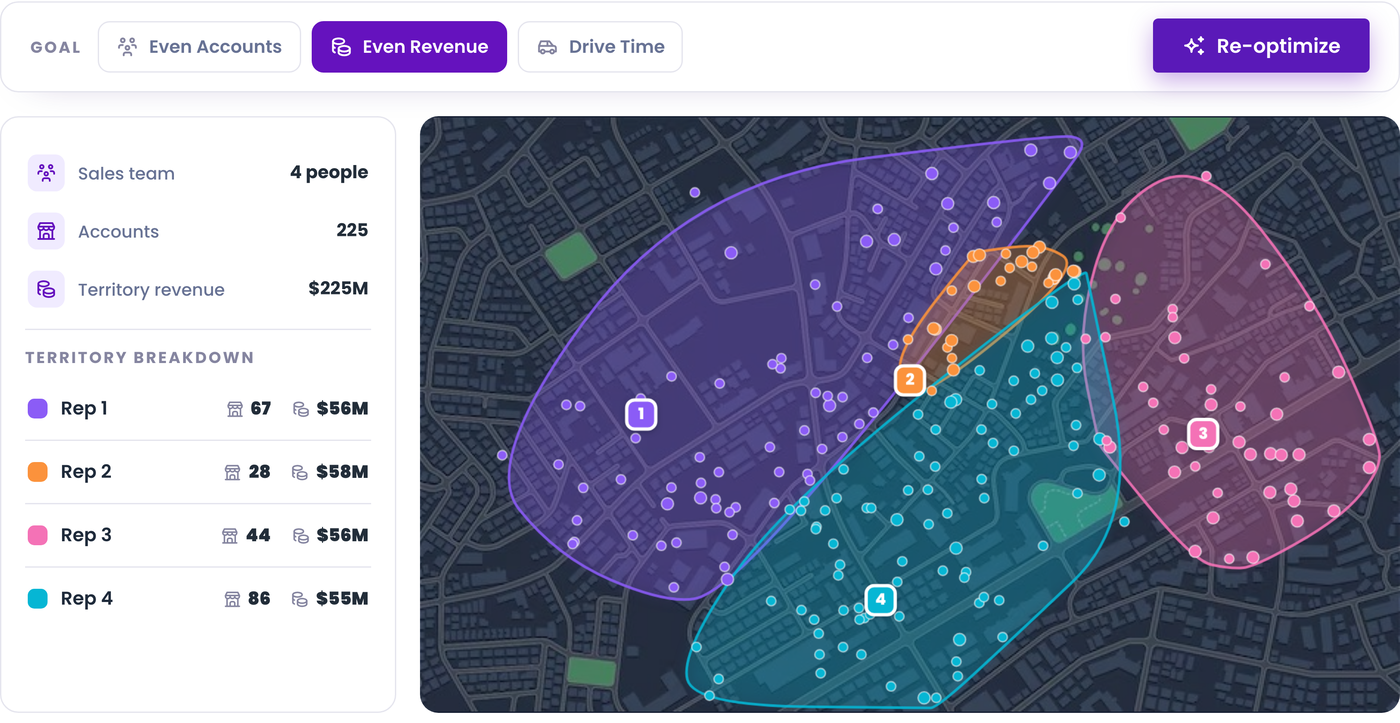
Mapsly draws territories, imports KML, GeoJSON, and Shapefiles, and balances on 50,000+ American Community Survey indicators—all included.

Salesforce Maps
KML boundary upload (5 MB); “not supported for Auto Assignment”9
Shape Layer builder: predefined regions, Draw on Map, or a pasted ZIP code list18
Auto Assignment with custom polygons: 100 vertices, 100 polygon rules per plan12
Shapefile or GeoJSON import
Territory Planning, through the Sales Planning add-on ($75 per user per month, annual contract)11
Incluído—desenho, atribuição e balanceamento com métricas
Polígonos desenhados à mão
Postal codes · KML / GeoJSON / Shapefile · Counties
Setores censitários · mais de 50,000 indicadores da American Community Survey
Auto-assign records to territories and sales reps
Live Tracking and Check-Ins From the Mobile App.
Mobile App

Live Tracking and Check-Ins From the Mobile App.

Mapsly's iOS and Android app tracks the team live, checks reps in on arrival, and keeps maps and CRM data available without signal—the layer Salesforce retired in August 2026.

Salesforce Maps
Standalone Maps mobile app retired August 31, 2026; removed from the App Store and Google Play1
Live Tracking Mobile: “your reps can no longer generate new geolocation data”2
Offline mode on the Maps Mobile tab: “an internet connection is required”7
Check In with a Verification Distance, logged as a Salesforce Activity8
Marker layers on mobile, up to 1,000 markers per layer (50,000 on desktop)17
Watch your team's current location and real-time movements on the map19
Check-in/out automático com base na proximidade20
Foto · Vídeo · Assinatura eletrônica · Código de barras / QR
Formulários adaptativos com ações ao alterar
Offline maps + CRM data, built in21
Mapsly AI · Private Beta

An Assistant That Talks Back, on the Road.

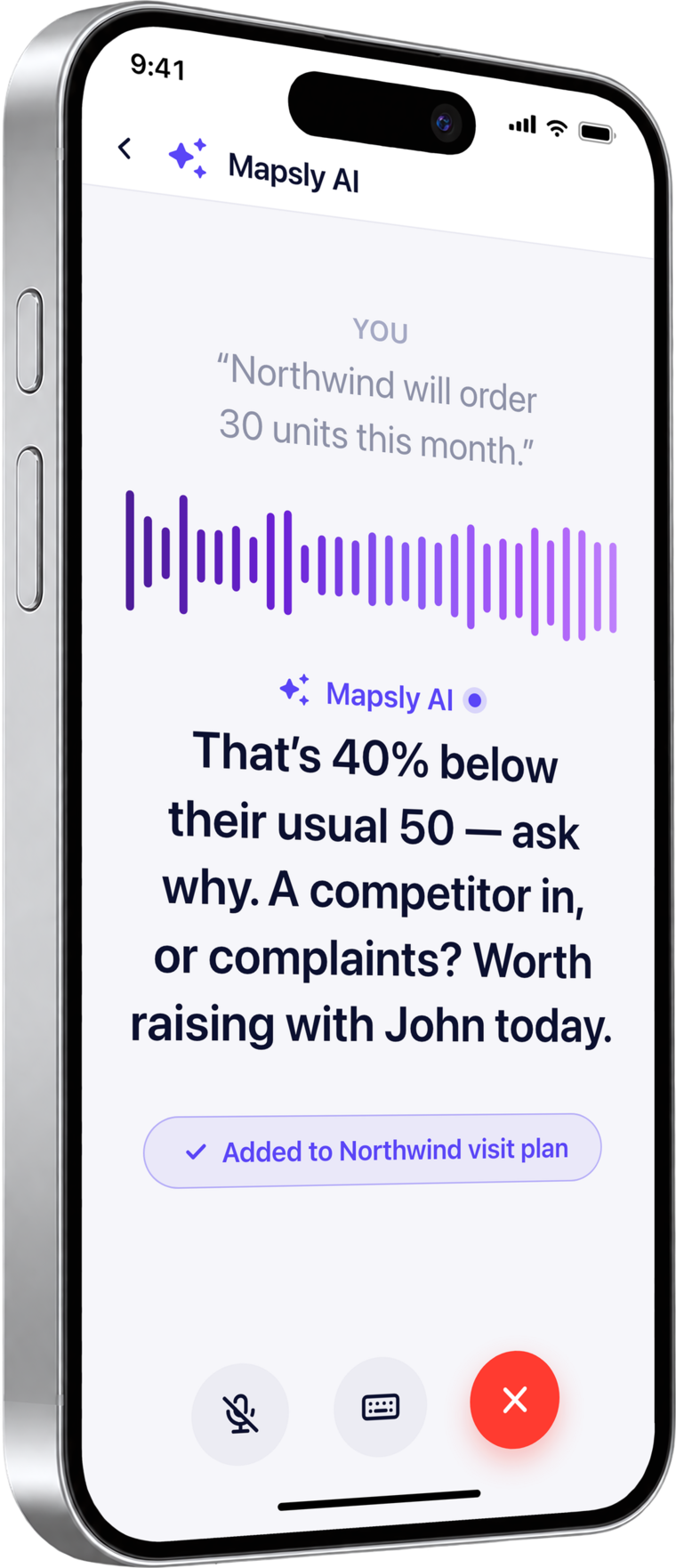
Mapsly AI knows your pipeline, asks the right question, and writes the outcome to Salesforce. Included in every plan—no AI seat, no add-on—and currently in private beta.

Mapsly AI voice mode on the phone
Mapsly AI · beta privada

Voice-to-CRM, Briefs, and Follow-Ups, Without Leaving the Car.

Say what happened at the visit; Mapsly AI stages the notes, field updates, tasks, and next visit in Salesforce's own structure, and nothing is written until you approve it with one tap.

Salesforce Maps
AI Visit Recommendations for managers; requires Maps Advanced with Visit Plans configured25
Embedded Guidance: recommendations and checklists inside Salesforce Maps22
Agentforce assistants, sold as a separate Salesforce product: “AI can be added to Core and above”; bundled in the Max edition23
Mapsly AI · beta privada
Voice-to-CRM: say it or type it; changes are staged for one-tap approval24
Talk to your CRM: ask anything across accounts, deals, territories, and your pipeline
Pre-meeting briefs: walk in knowing the deal, the people, and the last conversation
Voice notes between stops become a clean summary on the account
Follow-up emails and texts drafted from the account context
Photo and business-card capture staged into records
Mapsly AI
Beta privada

Modo de voz AI

Todos os planos
Obter uma demonstração
9:41
Voice — next stop
You · Voice

“Hey Mapsly, what’s my next stop?”

Speaking

Nordwind Supply, 12 minutes away. You’re meeting Sarah Lee, Ops Lead. $40,000 deal in Negotiation.

Speaking

Last visit, 12 June: she promised a pilot by August. Ask how it went.

ListeningSpeakingEnd
I’m listening — go ahead.Speaking…
Type a message…
Your data
Nordwind Supply · Deal
Next visitToday · 12 min away
ContactSarah Lee, Ops Lead
Amount$40,000
StageNegotiation
Last visit12 Jun · promised a pilot by August

Mapsly AI está em beta privado. Fale conosco to join the waitlist and get early access, and we will set up a personalized demo on your Salesforce data. See everything Mapsly AI does.

ROI da equipa de campo

O que os clientes relatam depois de usar Mapsly.

Duas perspectivas: resultados que os usuários do Mapsly relatam de suas próprias equipes de campo, e o que a calculadora de ROI projeta para uma equipe de exemplo com 15 representantes.

Relatado por clientes da MapslyResultados de equipes de campo da base de clientes da Mapsly.
20%
mais paradas de serviçomesma equipe
60%
menos tempo planejandorotas por semana
3×
mais dados por visitamesmo horário do representante de vendas
Projetado pela calculadora de ROIModeled annual results for a 15-rep field team—adjust every input in the live calculator.
Valor anual líquido
$130,584
Economia de combustível + tempo liberado − custo anual do Mapsly
Horas liberadas
2,574
Para toda a equipe, anualmente,
Multiplicador de retorno
17×
Retorno sobre o investimento no Mapsly
Insira seus próprios números:Abrir a calculadora de ROI
Based on Salesforce's public website and documentation as of October 2026—may contain errors. Spotted something? Email [email protected].
Nas palavras deles

Histórias de clientes de equipas de campo.

“Mapsly boosted our team’s productivity by +200%, far beyond our expectations. Choosing Mapsly as a technology partner allowed us to save over $500,000 compared to investments into a solution based on Salesforce that we initially explored.”

EL
Erick Lindenberg
Gerente de operações · Zeitview
Leia o estudo de caso da Zeitview

“Last week, we remapped our entire sales force in just two days. Before, that would have taken us about two weeks.”

BR
Billy Reagin
Gerente nacional de vendas · Fox Factory
Leia o estudo de caso da Fox Factory

“Before, planning a route took 1–2 hours. With Mapsly it takes 10–15 minutes and we’re ready for the next day.”

GL
Gabriel Lussier
Responsável por go-to-market · Cisolift
Leia o estudo de caso da Cisolift

Already on Salesforce Maps? Keep Salesforce. Add Mapsly in minutes.

Connect your Salesforce org in a guided wizard, map the objects you route today, and run both side by side during the trial—nothing to export, nothing to migrate.

Perguntas frequentes

Perguntas frequentes

Falar com a equipe

Yes—Mapsly offers native two-way sync with Salesforce, HubSpot, Zoho, Pipedrive, Microsoft Dynamics 365, and other major CRMs, plus spreadsheets and custom sources via REST API—and it routes and reads any object the CRM exposes, with every field mirrored automatically.21 Salesforce stays your system of record; there is nothing to export or migrate. If you add a tab in Lightning, reps open Mapsly without leaving Salesforce: see Embedding Mapsly into your Lightning Experience.
Two things, per Salesforce's own help center. The standalone Salesforce Maps mobile app was retired and removed from the App Store and Google Play; field users are directed to the Maps Mobile tab inside the Salesforce mobile app, which “Doesn't support offline mode and an internet connection is required.”17 And Maps Live Tracking Mobile subscriptions ended: “After August 31, 2026, your reps can no longer generate new geolocation data.” Salesforce suggests Mileage Administration, Check In, and the third-party app TripLog instead.2 The desktop Maps experience is not affected.
Usually, but compare the plan you would actually buy. Salesforce Maps lists $75 per user per month and Maps Advanced $125 (the same page's FAQ says $150), billed annually on a 12-month contract, and it is not included in a Sales Cloud subscription.16 Mapsly lists $35, $65, and $95 per user per month, or $30, $55, and $80 billed annually. Two-way sync, team routing, territories, automation, and offline mode start on the Pro plan; Shared Maps and Analytics are paid add-ons. Mapsly's pricing is public at mapsly.com/pricing, there is no seat minimum, and implementation is included—where Salesforce prices Quick Start implementation at $5,000 or $10,00013 and Premier support at 30% of net license fees.15
Yes. Start the free trial alongside your current setup—nothing to rip out—and a Mapsly solution engineer configures your CRM connector, imports your data, and builds your first workflow and custom app inside the subscription. The desktop Maps experience can stay while your reps use the Mapsly app for routes, live tracking, and check-ins.
Salesforce Maps routes up to 150 waypoints per route with traffic (120 time-based) and schedules up to 120 events per day,3 planning one day in Routes or one week in Schedule;4 multi-rep, multi-week generation needs Maps Advanced visit plans, up to 3 months.5 Mapsly optimizes the whole team in one run—thousands of stops, every rep, multiple days—with capacity, skills, and open hours in the optimizer, and it reroutes unvisited stops from the rep's current location.
Yes, and it imports more formats. Salesforce Maps accepts KML up to 5 MB, which “KML files are not supported for auto-assignment”;9 custom-geometry shape layers made outside its interface are unsupported;18 and Territory Planning is part of the separate Sales Planning add-on at $75 per user per month on an annual contract.11 Mapsly adds boundary-file import (KML / GeoJSON / Shapefile), postal-code and county libraries, and balancing on 50,000+ American Community Survey indicators—so you plan on real market data—with drawing, assignment, and balancing with metrics included.
Yes. Mapsly AI works with the Salesforce objects and fields you connect, and it is in private beta: contact us to join the waitlist and we will set up a personalized demo on your data. It is included in every plan with a monthly AI allowance per user—no AI seat, no add-on.24 Voice-to-CRM stages the notes, field updates, tasks, and next visit for one-tap approval before anything is written to Salesforce.
Mapsly is SOC 2 Type II, GDPR, HIPAA, and CCPA compliant, with data encrypted in transit and at rest.21 Access to your Salesforce data uses your own Salesforce login and permissions, and the Mapsly listing is on the Salesforce AppExchange.
Start the free trial of the full platform alongside your current setup—nothing to rip out—and a Mapsly solution engineer configures your CRM connector, imports your data, and builds your first workflow and custom app inside the subscription.21 Begin with one-way sync if you prefer and switch to two-way when you are ready.
Pronto quando você estiver

See Mapsly on Your Data—in 30 Minutes.

Traga uma exportação de CRM de exemplo. Saia com um plano roteirizado, um território desenhado, e um fluxo de trabalho que dispara na entrada na cerca geográfica.

30 min
em uma chamada com um engenheiro da Mapsly
15+
CRMs compatíveis de forma nativa
$0
não é necessário cartão de crédito
Fontes & Notas

Snapshot Table Footnotes

Where Salesforce Maps is marked unavailable (✗), we found no public documentation of that capability on Salesforce's official surfaces as of October 22, 2026. Salesforce help-center pages render in the browser; every quote below was confirmed on the live page on October 22, 2026. If we missed something, email [email protected].

  1. Mobile app retired. Salesforce Help, “Salesforce will retire the standalone Salesforce Maps mobile app on August 31, 2026.” “The app will be removed from the Apple App Store and Google Play Store on the retirement date.” Field users are directed to “the Maps Mobile tab on the Salesforce Mobile App.” The Google Play listing returned a 404 when we checked on October 22, 2026. Retrieved October 22, 2026. help.salesforce.com · Maps Mobile App Retirement (005314199)
  2. Live Tracking Mobile retired. Salesforce Help: “Salesforce is retiring the Salesforce Maps Live Tracking Mobile feature subscriptions, and we will continue to honor your existing subscription until August 31, 2026.” “After August 31, 2026, your reps can no longer generate new geolocation data.” Suggested alternatives are Mileage Administration, Check In, and a third-party app: “For real-time visibility into employee locations in the field, consider TripLog.” Retrieved October 22, 2026. help.salesforce.com · Salesforce Maps Live Mobile Retirement (005103356)
  3. Route caps. “You can route up to 150 waypoints with traffic. This includes start and ending waypoints.” “You can route up to 120 waypoints as a time-based route.” “If you're using the schedule, you can have a maximum of 120 Events on a given day.” Optimizations near these limits “take up to two minutes to complete.” Retrieved October 22, 2026. help.salesforce.com · Salesforce Maps Route Limitations (000381354)
  4. Horizonte de planejamento. “Schedule allows users to optimize up to a week of appointments at a time, while Routes allows users to optimize up to a day of appointments at a time.” Retrieved October 22, 2026. help.salesforce.com · Compare Salesforce Maps Route and Schedule (000381117)
  5. Maps Advanced. “Salesforce Maps Advanced automates users' schedules and routes for up to 3 months.” Managers define visit plans; reps generate their own routes from them. Maps Advanced is the higher-priced edition (see note 16). Retrieved October 22, 2026. help.salesforce.com · Automate User Schedules and Routes in Salesforce Maps
  6. Custom data sources. Uploading custom location data to Salesforce Maps as CSV files: “That capability was retired on May 16, 2025.” The documented alternative is creating Salesforce custom objects and marker layers; Maps plots Salesforce objects only. Retrieved October 22, 2026. help.salesforce.com · Visualize Custom Data Sources in Salesforce Maps (000393311)
  7. No offline mode. On the Maps Mobile tab inside the Salesforce mobile app: “Doesn't support offline mode and an internet connection is required.” “Salesforce Maps Standalone Mobile app (requirement for Live Tracking) retired on August 31, 2026.” Retrieved October 22, 2026. help.salesforce.com · Salesforce Maps Mobile App Experience (000380283)
  8. Check-in. “Verification Distance—require mobile users to be within a given distance of the record's geolocation to check in.” “Checking in logs an activity and marks it complete. If you require notes, include a custom disposition.” A custom disposition is a field set on the Task object; photo, e-signature, or file capture inside the check-in is not documented. Retrieved October 22, 2026. help.salesforce.com · Set Up Activity Logging in Salesforce Maps
  9. Boundary import. “Salesforce Maps treats KMLs as a document and is bound to the 5MB size limit.” “KML files are not supported for auto-assignment or the point-in-polygon global method.” Shapefile and GeoJSON import are not documented for Salesforce Maps. Retrieved October 22, 2026. help.salesforce.com · Upload a KML File in Salesforce Maps (000389858)
  10. Dados demográficos. “Embed business, property, and demographic data into a mapped view.” Retrieved October 22, 2026. salesforce.com · Salesforce Maps product page
  11. Territory Planning add-on. Territory Planning is sold inside the Sales Planning edition: “$ 75 USD/User/Month (Billed annually)”, feature list “Hierarchy Management”, “Segment Design”, “Territory Planning”; “This edition requires an annual contract.” The Sales add-ons page describes it as “Easily segment your customers, carve your territories, allocate your quota, and more.” Retrieved October 22, 2026. salesforce.com · Sales Planning pricing
  12. Auto-assignment limits. “No, KML files are not supported for Auto Assignment.” “Each custom polygon can have a maximum of 100 vertices/points.” “Each assignment plan can only contain a maximum of 100 rules that include custom polygons.” Retrieved October 22, 2026. help.salesforce.com · Salesforce Maps Auto Assignment FAQ (000353443)
  13. Paid implementation. Salesforce's own datasheet prices partner-delivered implementation: “Quick Start Growth — Price: $5,000 USD — Duration: 4 weeks” (Salesforce Maps, or Territory Planning up to two alignments) and “Quick Start Plus — Price: $10,000 USD — Duration: 8 weeks” (Maps with Advanced Routing). Retrieved October 22, 2026. salesforce.com · Salesforce Maps Quick Starts datasheet (PDF)
  14. No trial. “We do not currently offer trial licenses for Salesforce Maps, but please reach out to us for more information on how Salesforce Maps can work for your organization.” Retrieved October 22, 2026. salesforce.com · Salesforce Maps pricing FAQ
  15. Support plans. Standard Success Plan, “Included in all licenses”: “Access to Knowledge Articles, documentation, and Trailhead” and the Trailblazer Community. Premier Success Plan: “30% of net license fees.” Retrieved October 22, 2026. salesforce.com · Salesforce Maps pricing, Success Plans
  16. List price and contract. Edition cards: Salesforce Maps “$ 75 USD/User/Month (Billed annually)”; Salesforce Maps: Advanced “$ 125 USD/User/Month (Billed annually).” The FAQ on the same page states a different Advanced price: “Maps has two versions, Maps and Maps Advanced, which cost $75 and $150 USD per user per month respectively and billed annually.” “No, Salesforce Maps is not automatically included in your Sales Cloud subscription.” “Standard Maps contracts are 12 months.” “Standard Maps plans are billed annually.” Retrieved October 22, 2026. salesforce.com · Salesforce Maps pricing
  17. Mobile marker cap. “Marker layers/queries will max out at 1,000 markers plotted in mobile.” On desktop: “Marker layers/queries will max out at 50,000 markers per layer.” Retrieved October 22, 2026. help.salesforce.com · Maps Marker Layer rendering limits (000380822)
  18. Custom shapes. “Creating shape layers outside the Maps User Interface with custom geometries isn't recommended or supported by Salesforce, as it can cause errors and lead to unpredictable results.” Supported inputs are predefined regions, Draw on Map, and a pasted list of ZIP codes. Retrieved October 22, 2026. help.salesforce.com · Salesforce Maps Shape Layer builder (000380180)
  19. Mapsly tracking. “Watch your team's current location and real-time movements on the map.” “When there's no active Internet connection, location data is accumulated and then transmitted to the server when the connection becomes available.” Mapsly reshuffles a route in progress “based on the user's current location to keep their route optimized.” Retrieved October 22, 2026. mapsly.com · Team location tracking
  20. Mapsly check-in. Check-in events log on a button, on a form, or “entirely automatically when they arrive at a location with the location tracking enabled.” Forms capture “notes, photos, and e-signatures, with real-time validation and immediate sync to your CRM.” Retrieved October 22, 2026. mapsly.com · Check-in and check-out with geofencing
  21. Mapsly and Salesforce. “All standard and custom objects, properties, and records, with two-way sync.” Offline-first iOS and Android apps with “offline maps and CRM data.” “Mapsly is SOC 2 Type II, GDPR, HIPAA, and CCPA compliant; data is encrypted in transit and at rest.” Free trial: “14 days with all features unlocked, no credit card required, and configuration support included.” Retrieved October 22, 2026. mapsly.com · Map for Salesforce
  22. Embedded Guidance. Salesforce Maps lists Embedded Guidance: “Direct field sales efforts with actionable recommendations that reflect corporate guidelines and best practices within Salesforce Maps.” Retrieved October 22, 2026. salesforce.com · Salesforce Maps product page
  23. Salesforce AI licensing. Sales Cloud editions page: “AI can be added to Core and above.” The Max edition lists “Everything in Advanced, plus our full suite of AI Agentforce for Sales and Agentforce Coworker” alongside Salesforce Maps. AI assistants are a Salesforce platform product licensed separately from the Maps add-on. Retrieved October 22, 2026. salesforce.com · Sales Cloud pricing
  24. Mapsly AI. “Mapsly AI is in private beta. Contact us to join the waitlist and get early access, and we will set up a personalized demo on your data.” “Included in every plan, no AI seat or add-on.” Cost: “Each plan includes a monthly AI allowance per user, pooled across everyone on the account and reset every month. A typical question costs a cent or two.” Plans: “Essential has advisory AI: instant CRM-data insights, pre-meeting briefs, voice notes, email and text drafts and intelligent reminders. Pro adds agentic AI: voice-to-CRM that stages and commits changes, agentic routing, AI sales coaching, searchable company knowledge and any AI model at its real cost.” Retrieved October 22, 2026. mapsly.com · Mapsly AI
  25. AI Visit Recommendations. Salesforce Maps offers manager-requested visit recommendations: “Salesforce Maps Advanced must also be installed, and Visit Plans must be configured within your Salesforce organization.” A manager sets dates, a recommendation strategy (a Flow), a site type, and visits per day, then reviews “the AI Visit Recommendations page.” Retrieved October 22, 2026. trailhead.salesforce.com · Get Visit Recommendations from Salesforce Maps